
C++ Fast Track for Games Programming Part 17: Audio
In part 16, you built a tank battle against waves of enemies. But it’s a silent battle, in which the shells fly and the tanks explode without a sound. In this part, we add the sound. You will:
- add a library to your project, so that the game can play sounds,
- how a computer stores and plays sounds,
- give every shell and explosion a sound, which comes from the place where it happens,
- give the tank engines a hum, which have a higher pitch when they drive faster,
- play background music that fades in and out depending on the gameplay,
- and add a few jingles that don’t require a sound file to play.
Sound is easy to forget, but it makes a big difference in your game. Turn the sound off in your favourite game, and see how much less fun it is. Sound also tells the player things that they can’t see, like that enemy that is just about to come around that corner.
Getting Started
Section titled “Getting Started”For this tutorial, you will start where part 16 ended: the arena battle. Download it here:
 part-17.zip
Extract the zip file to C:\Projects\C++ Fast Track: it contains a Part 17 folder. Open tmpl8.slnx in the C:\Projects\C++ Fast Track\Part 17 folder.
We will be starting from where we left off in part 16. The assets folder has a new sounds folder with the sounds of this part, as OGG files. The cannon and the explosion of a tank are made from Cannon Fire and Battle at Sea by Thimras, and the explosion of a shell from the Tiny Naval Battle Sounds Set by Iwan Gabovitch. The hits and the engine come from two sound packs by Kenney, Impact Sounds and Sci-fi Sounds. The music is Fast fight / battle music by Ville Nousiainen. They all share their work for free, under the CC0 license. CREDITS.md in the sounds folder lists which sound came from where.
The starting point: the arena battle of part 16, without a sound. (Click the demo first, so that it gets the keys.)
Adding a Library
Section titled “Adding a Library”C++ itself can’t play sounds. The template uses SDL for the window, the keyboard and the mouse, and SDL can play sound too. But SDL leaves a lot of work to you. It plays a stream of numbers, and loading a file, mixing several sounds together, and placing a sound to the left or the right of the player are up to you. Instead, we use a library that does that work for us. It’s called Audio, a small audio library for games, made for this course.
The Audio library doesn’t need SDL. It is built on miniaudio, which talks to the sound system of Windows, Linux or the web browser by itself. So you can also use it in your own projects that don’t use SDL or this template, like a game made with another framework. In a project of your own, the steps to use the library are almost the same as the ones shown below (only the folders will be different).
A library is code that someone else wrote, ready for you to use. It comes in two or three parts:
- The header files (
.hppor.h) tell the compiler which classes and functions the library has. You#includethem, like you did withgame.hpp. - The library file (
.lib) contains the compiled code. The linker adds the code in the library to your executable. - Some libraries also come with a shared library. On Windows, that’s a DLL (a dynamic-link library,
.dll). On Linux, it’s a shared object (.so), and on macOS a dynamic library (.dylib). Then the compiled code isn’t added to your executable, but stays in the shared library, which the operating system loads when your program starts. The.libfile of a DLL is small, because it only tells the linker which functions are in the DLL. The template uses SDL this way, soSDL3.dllmust be next totmpl8.exe, or the game doesn’t start.
In this part, we don’t use a shared library for the Audio library. So your project only needs to know where the header files and the library file are. That’s what this section is about. You only need to set this up once for every project that uses the library.
Downloading the Library
Section titled “Downloading the Library”Go to the releases of the Audio library, and download Audio-2.0.1-windows-x64-static.zip. Static means that the code of the library becomes part of your .exe, so your game doesn’t need an extra DLL file to run.
Extract the zip file. It contains an include folder (the header files) and a lib folder (the library files). Make a new folder Audio in the lib folder of your project (next to the SDL3 folder, which holds the SDL library), and copy the include and lib folders into it. (You don’t need to copy the cmake folder in lib, we’re not using CMake in this project.) Your project should now look like this:
Part 17├── assets├── lib│ ├── Audio│ │ ├── include│ │ │ └── Audio│ │ │ ├── Audio.hpp│ │ │ └── ...│ │ └── lib│ │ ├── Debug│ │ │ └── Audio.lib│ │ └── Release│ │ └── Audio.lib│ ├── SDL3│ └── stb├── tmpl8├── game.cpp├── game.hpp├── tmpl8.slnx└── ...There are two versions of Audio.lib, one for the Debug build of your game, and one for the Release build.
Telling Visual Studio Where It Is
Section titled “Telling Visual Studio Where It Is”In the Solution Explorer, right-click the tmpl8 project, and select Properties.
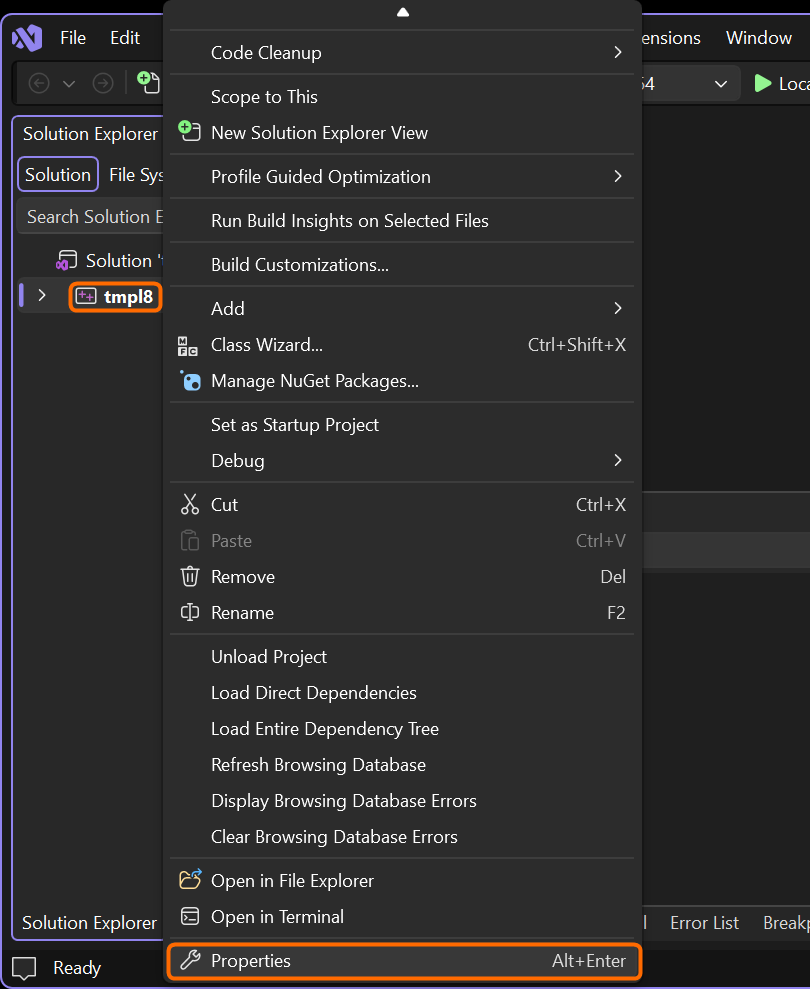
The context menu of the tmpl8 project, with Properties at the bottom.
At the top of the Property Pages window that opens, set Configuration to All Configurations, so that your changes are made for both the Debug and the Release build. Set the Platform to x64.
-
Go to C/C++ > General. Click Additional Include Directories, and then the arrow at the end of the line, and select Edit…. The list already has the folders of SDL and stb libraries. Add this line below them:
$(SolutionDir)lib\Audio\include$(SolutionDir)is a macro of Visual Studio. It evaluates to the folder of the solution (thePart 17folder, where thetmpl8.slnxfile is). Using a macro instead of the full path to the folder, these settings will keep working regardless of where your project and solution files are.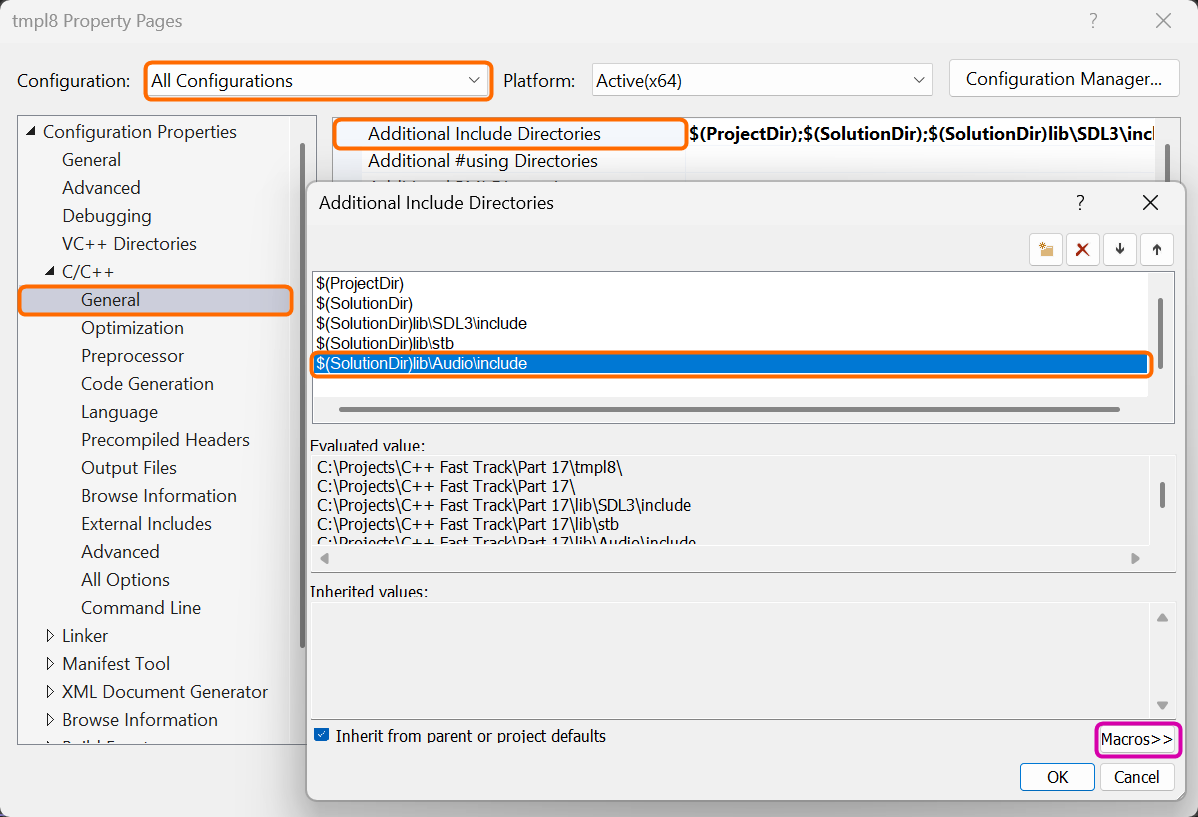
The Audio library’s include folder, added to the Additional Include Directories. The evaluated values show what the macros stand for. (Click the image to see it at full size.)
-
Go to Linker > General, and add this to Additional Library Directories in the same way:
$(SolutionDir)lib\Audio\lib\$(Configuration)$(Configuration)is another macro. It isDebugorRelease, depending on the build you are making. So each build finds its own version ofAudio.lib.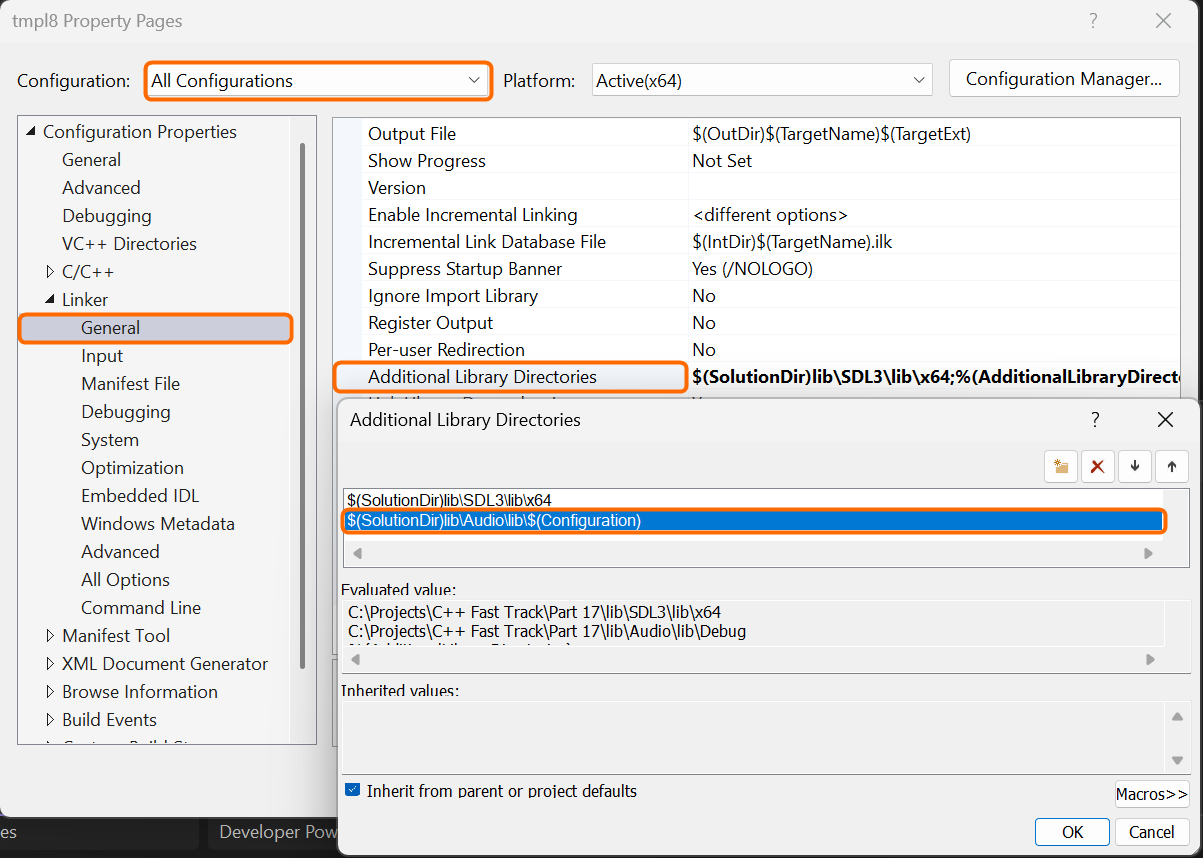
The Audio library’s library folder, added to the Additional Library Directories. With All Configurations selected, the evaluated value shows the folder of the Debug build.
-
Go to Linker > Input, and add a line with
Audio.libto Additional Dependencies (belowSDL3.lib).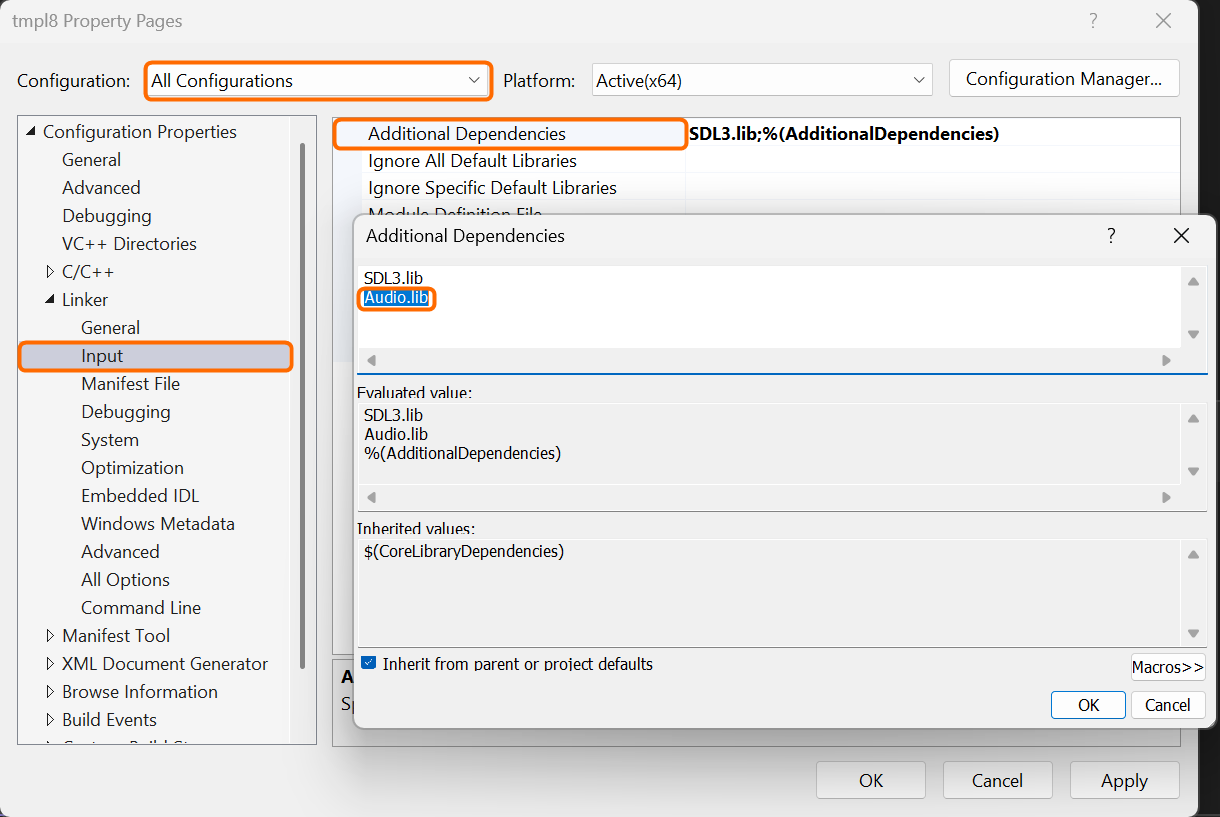
Audio.lib, added to the Additional Dependencies, belowSDL3.lib.
Click OK to save the settings.
A First Sound
Section titled “A First Sound”Time to test it. Open game.cpp, and include the header of the library at the top:
#include "game.hpp"
#include <Audio/Audio.hpp>
#include <algorithm>The angle brackets (< and >) tell the compiler to look for the file in the include directories, which are the folders in the project settings. That’s where it finds Audio/Audio.hpp now.
Now make some noise. In Tank::Fire, play a sound when the tank fires:
void Tank::Fire(float spread) { if (reload > 0) return; for (int i = 0; i < MaxShells; i++) if (shells[i].time <= 0) { const vec2 direction = Rotate(aim, Rand(2 * spread) - spread); shells[i] = { body.position + aim * 30, direction * ShellSpeed, ShellTime, color }; reload = ReloadTime; Audio::playSound("assets/sounds/fire1.ogg"); return; } }Audio::playSound loads a sound file and plays it. The Audio:: in front means that the function is part of the Audio namespace. Just like the template puts its code in the namespace Tmpl8, the library puts all of its code in Audio, so that its names never clash with yours. A game can have its own playSound function, which is a different function than Audio::playSound.
Press F5, and fire. Do you hear the cannon? Then the library works. The enemies fire with the same Fire, so you hear them too.
Every shot makes a sound. (Click the demo first, because a browser only plays sound after you click the page. Only the demo that you clicked last plays sound, so the demos on this page don’t all play at once.)
If it doesn’t build, check the settings again:
| Error | Fix |
|---|---|
cannot open source file "Audio/Audio.hpp" or C1083: Cannot open include file: 'Audio/Audio.hpp' |
The include directory isn’t right (step 1). Is the include folder in lib\Audio? Did you change the settings for All Configurations? |
LNK1104: cannot open file 'Audio.lib' |
The library directory isn’t right (step 2). Are the Debug and Release folders in lib\Audio\lib? |
LNK2019: unresolved external symbol audio_... |
Audio.lib is missing in Additional Dependencies (step 3). |
If the game runs, but stays silent, look at the console window. The library prints a message there when it can’t find a sound file.
What Is Sound?
Section titled “What Is Sound?”Before we add more sounds, let’s look at what a sound actually is.
When a shell explodes, it pushes the air around it away, very fast. That air pushes the air next to it, and so on. A wave of air pressure spreads in all directions, at about 343 meters per second. When the wave reaches your ear, it pushes your eardrum in and out, and you hear a bang. A speaker does the same thing in reverse. An electric signal moves a cone back and forth, and the cone pushes the air.
So a sound is a wave, in which the air pressure goes up and down over time. Two things describe a simple wave:
- The frequency is how many times per second the wave goes up and down, in hertz (Hz). The time of one up and down is the period. A higher frequency sounds higher. A low drum is around 60 Hz, the A that orchestras tune to is 440 Hz, and a whistle can be over 2000 Hz. People hear frequencies from about 20 Hz to 20,000 Hz (less when they get older).
- The amplitude is how far the wave goes up and down. A bigger amplitude sounds louder.
Real sounds, like an explosion or a voice, are mixes of many frequencies at once, which change all the time. But a single, simple wave is a sound too, which is called a tone. The demo below shows four simple waves, the sine, the square, the triangle and the sawtooth. Old game consoles used them, because they are easy to make with electronics. They have the same frequency, but they don’t sound the same. Press Play to hear them.
Samples
Section titled “Samples”A computer can’t store a smooth wave. Instead, it measures the wave many times per second, and stores each measurement as a number, which is called a sample. That’s the dots in the demo. The number of samples per second is the sample rate. Most sounds use 44,100 or 48,000 samples per second. Why so many? To follow a wave, you need at least two samples in every period, one when it is up and one when it is down. So to store frequencies up to 20,000 Hz (the highest that people can hear), you need more than 40,000 samples per second. Set the sample rate in the demo to 2000 Hz, and turn up the frequency. When there are fewer than two samples in a period, the dots can’t follow the wave anymore.
A sample is a number between -1 and 1 (often stored as a 16-bit integer, between -32,768 and 32,767). A sound file is a long list of these numbers. A stereo sound has two lists, one for the left speaker and one for the right speaker. A mono sound has only one. All of this adds up. One second of stereo sound at 44,100 samples per second, with 2 bytes per sample, is 176,400 bytes. The music of this part takes 25 seconds, so it would need 4.4 MB.
That’s why the sounds of this part are OGG files. Like a JPG for images, OGG (and MP3) leave out the details that you hardly notice, and pack the rest very tightly, so the music is only 449 KB as an OGG file. The other big sound format, WAV, stores all the samples, like a BMP for images. The Audio library can play any of these.
Sound Effects
Section titled “Sound Effects”Audio::playSound is easy to use and it’s great for playing 1-shot sound effects, but it doesn’t give you any control. You can’t change the volume of the sound, or stop it. For that, the library has the Audio::Sound class. You load a sound file into an Audio::Sound once, and then you can play it as often as you like:
Audio::Sound coin("assets/coin.wav");
coin.play();   // play the sound (when it is already playing, it just keeps playing)coin.replay(); // play the sound from the startcoin.stop();   // stop the sound (play continues where it stopped, same as pause)coin.setVolume(0.5f); // 0 is silent, 1 is the volume of the filecoin.setPitch(1.5f);  // 1 is the pitch of the file, higher is higher (and faster)
There is one catch. A sound can only play once at the same time. Two tanks that fire at the same moment need two sounds. And copying an Audio::Sound doesn’t help, because a copy of a sound just points to the same sound, not a new one (just like a reference or a copy of a pointer). To play a sound several times at once, you load it several times. The library ensures that sound files are loaded only once, so it’s cheap to create multiple sounds that all load the same sound file.
Voices
Section titled “Voices”We put this in a struct of its own, an effect, with a few copies of a sound that take turns. These copies are called voices. Add this to game.cpp, just above struct Shell:
// A sound effect that can be heard several times at once, like when two tanks fire at the same moment. A copy of an // Audio::Sound is the same sound, so an effect has a few sounds of its own (its "voices"), which take turns. struct Effect { static constexpr int Voices = 6; Audio::Sound voices[Voices]; int next = 0; // the voice that plays next
void Load(const std::string& name, int variations = 1, float volume = 1); void Play(); };static constexpr makes Voices a constant that belongs to the struct, so every effect has 6 voices. next is the voice that plays the next time. With 6 voices, an effect can be played 6 times at once. That’s plenty. A seventh shot would restart the voice of the first one, which should be almost over anyway.
Load loads the sound into every voice:
// Loads the voices from assets/sounds/name.ogg, or, with variations, from name1.ogg, name2.ogg, ... in turn. void Effect::Load(const std::string& name, int variations, float volume) { for (int i = 0; i < Voices; i++) { const std::string file = variations > 1 ? std::format("assets/sounds/{}{}.ogg", name, i % variations + 1) : std::format("assets/sounds/{}.ogg", name); voices[i].load(file); voices[i].setVolume(volume); } }Hearing exactly the same explosion over and over again soon gets boring. So an effect can have variations, which are a few different files of the same kind of sound, like explosion1.ogg, explosion2.ogg and explosion3.ogg. With 3 variations, the voices get the files 1, 2, 3, 1, 2, 3, because i % variations goes 0, 1, 2, 0, 1, 2, and the + 1 makes that 1, 2, 3, 1, 2, 3. Without variations, the file name has no number. std::format builds the file name, just like it builds the status line at the top of the screen. It puts its arguments into the {} of the text, one after the other: name and the number, or only name if there is only 1 variation. Inside the {}, you can also say how a value should look, as you saw in part 9. The format specification on cppreference lists all the options. The volume is set to the same value for every voice.
Play plays the next voice, and moves next on to the voice after it:
// Plays the next voice from the start, a little higher or lower each time. void Effect::Play() { Audio::Sound& voice = voices[next]; next = (next + 1) % Voices; voice.setPitch(0.9f + Rand(0.2f)); // between 0.9 and 1.1 voice.replay(); }The (next + 1) % Voices ensures that next goes back to 0 after the last voice. voice.replay starts the voice from the beginning, even when it is still playing. The pitch changes a little every time. Rand(0.2f) is a random number between 0 and 0.2, so the pitch is between 0.9 and 1.1. A higher pitch plays the sound faster, so it sounds higher and shorter, like a record that spins too fast. A small random change makes every shot sound a little different, without that, the voices will start to sound very repetitive.
Below Effect, add the effects of the game:
Effect fireSound, explosionSound, hitSound, destroyedSound;Playing the Effects
Section titled “Playing the Effects”In UpdateShells, a shell that hits a tank makes a clang of metal:
for (int t = 0; t < tankCount; t++) { Tank& tank = *tanks[t]; // tanks[t] is a pointer so we need to use * to dereference it if (tank.health > 0 && Overlaps(circle, Circle{ tank.body.position, tank.body.radius })) { tank.health -= ShellDamage; // a tank that is hit loses health (a destroyed tank can't be hit) hit = true; hitSound.Play(); } }A little further down, a shell that hit something explodes, and the explosion makes a bang:
// a shell that hit something explodes, and is free again for the next shot if (hit) { Explode(shell.position); shell.time = 0; explosionSound.Play(); }In Tank::Fire, replace Audio::playSound with the fire effect:
void Tank::Fire(float spread) { if (reload > 0) return; for (int i = 0; i < MaxShells; i++) if (shells[i].time <= 0) { const vec2 direction = Rotate(aim, Rand(2 * spread) - spread); shells[i] = { body.position + aim * 30, direction * ShellSpeed, ShellTime, color }; reload = ReloadTime; fireSound.Play(); return; } }Now load the effects at the end of Init, just before Restart():
// the sound effects: the shots, the explosions and the hits have 3 variations each fireSound.Load("fire", 3, 0.6f); explosionSound.Load("explosion", 3, 0.5f); hitSound.Load("hit", 3); destroyedSound.Load("destroyed"); Restart();The shots, the explosions and the hits have 3 variations each. The cannon is a bit softer, and so are the explosions, of which there are many. The volumes are a matter of taste, so try what you like.
And a tank that is destroyed explodes with a deep boom. That happens in Tick, first for the player:
// destroyed tanks: the player's game is over; an enemy explodes and leaves the battle if (player.health <= 0 && !gameOver) { Explode(player.body.position); destroyedSound.Play(); Hide(player, MaxEnemies); // out of sight, so that the enemies stop firing at the wreck gameOver = true; }Right below it, the same goes for every enemy that is destroyed:
int remaining = 0; // the number of enemies that are still in the battle for (int i = 0; i < MaxEnemies; i++) { if (enemies[i].health > 0) remaining++; else if (enemies[i].body.position.x > 0) // destroyed, but not hidden yet { Explode(enemies[i].body.position); destroyedSound.Play(); Hide(enemies[i], i); score++; } }A destroyed enemy is hidden offscreen right after it explodes, so its boom plays only once. Now every shot, hit and explosion has a sound of its own. Run the game, or try it in the demo below.
Shots, explosions, hits and destroyed tanks. (Click the demo first, so that it gets the keys and can play sound.)
Sound in the World
Section titled “Sound in the World”Every sound now plays at the same volume, in the middle. But an enemy that fires on the right side of the screen should sound like it’s on the right, and an explosion far away should be softer than one next to you. That’s called spatial audio (or 3D audio). The library places every sound somewhere in the world, and calculates what a listener (the ears of the game) hears from there.
The Audio library is built to work in 3D worlds, with an x, y and z axis, and Audio::Vector is a 3D vector. Its y axis points up. Our map is flat, so it lies on the ground of that 3D world. The x of the screen is the x of the audio world, and the y of the screen is its z. By default, the listener looks along the negative z axis, so “forward” is up on the screen, and “right” is the right of the screen.
Where is the listener? In a game where you see your character from behind, the listener is the camera. But we look down on the map, from above. So we put the listener above the player’s tank, as if the player sits in a helicopter that follows the tank. That height turns out to be important, as you will see in the demo below. Add this below Separate, the last function of the physics:
// The audio world is 3D, and its y axis points up. The map lies flat in it: the x of the screen is its x, and the // y of the screen is its z. The listener (the ears of the game) hovers ListenerHeight pixels above the map. constexpr float ListenerHeight = 200;
// A position on the map (and a height above it) as a position in the audio world. Audio::Vector ToAudio(vec2 position, float height = 0) { return { position.x, height, position.y }; }ToAudio turns a position on the map into a position in the audio world. position.y becomes the z, and the height becomes the y.
Distance
Section titled “Distance”A sound gets softer when it is further away. How much softer depends on the attenuation model of the sound. The Audio library uses the inverse attenuation model by default, in which the volume of a sound is computed by:
Closer than minDistance, the sound plays at its full volume. At twice that distance, it plays at half the volume, at three times the distance at a third, and so on (with a rolloff of 1, the default). That’s roughly how sound behaves in the real world. The default minDistance is 1, which works when your world is in meters. But our world is in pixels, and at 1 pixel, the volume would already drop at the edge of the tank. So every voice gets a minDistance of ListenerHeight. A sound right below the listener plays at full volume, and the volume drops from there. Add one line to Load:
// Loads the voices from assets/sounds/name.ogg, or, with variations, from name1.ogg, name2.ogg, ... in turn. void Effect::Load(const std::string& name, int variations, float volume) { for (int i = 0; i < Voices; i++) { const std::string file = variations > 1 ? std::format("assets/sounds/{}{}.ogg", name, i % variations + 1) : std::format("assets/sounds/{}.ogg", name); voices[i].load(file); voices[i].setVolume(volume); voices[i].setMinDistance(ListenerHeight); // closer than this, a voice plays at its full volume } }Left and Right
Section titled “Left and Right”The listener has two ears (or two speakers), one on the left and one on the right. Each speaker plays a part of the sound, and a bigger part when the sound is on its side. A sound straight ahead is played by both speakers equally. A sound on the far right is mostly played by the right speaker, but a bit of it still comes out of the left speaker, just like your left ear still hears a sound on your right.
Drag the listener and the sound around in this demo, to see how loud each speaker plays the sound. The meters on the right show the volume of the sound (from the distance), and the parts that the left and the right speaker play of it. Then change ListenerHeight. When the listener is low (close to the map), the sound jumps from one speaker to the other when it passes the listener. That’s what the height is for. From high above, every sound on the map is more or less in front of the listener, and only drifts to the left or the right.
The dashed circle around the listener shows where the distance (in 3D) is less than minDistance. Inside it, the sound plays at its full volume. When ListenerHeight is as big as minDistance, the circle is gone, because every sound on the map is at least ListenerHeight away.
Placing the Sounds
Section titled “Placing the Sounds”Play gets a position now. Change its declaration in the Effect class:
struct Effect { static constexpr int Voices = 6; Audio::Sound voices[Voices]; int next = 0; // the voice that plays next
void Load(const std::string& name, int variations = 1, float volume = 1); void Play(vec2 position); };The definition of Play puts the voice at that position before it plays:
// Plays the next voice from the start, at a position on the map, a little higher or lower each time. void Effect::Play(vec2 position) { Audio::Sound& voice = voices[next]; next = (next + 1) % Voices; voice.setPosition(ToAudio(position)); voice.setPitch(0.9f + Rand(0.2f)); // between 0.9 and 1.1 voice.replay(); }Then give every effect the position where it happens. A tank fires from its own position:
void Tank::Fire(float spread) { if (reload > 0) return; for (int i = 0; i < MaxShells; i++) if (shells[i].time <= 0) { const vec2 direction = Rotate(aim, Rand(2 * spread) - spread); shells[i] = { body.position + aim * 30, direction * ShellSpeed, ShellTime, color }; reload = ReloadTime; fireSound.Play(body.position); return; } }A shell hits a tank where the shell is:
for (int t = 0; t < tankCount; t++) { Tank& tank = *tanks[t]; // tanks[t] is a pointer so we need to use * to dereference it if (tank.health > 0 && Overlaps(circle, Circle{ tank.body.position, tank.body.radius })) { tank.health -= ShellDamage; // a tank that is hit loses health (a destroyed tank can't be hit) hit = true; hitSound.Play(shell.position); } }And it explodes in the same spot:
// a shell that hit something explodes, and is free again for the next shot if (hit) { Explode(shell.position); shell.time = 0; explosionSound.Play(shell.position); }The listener must follow the player. Audio::getListener() gives you the listener, and setPosition moves it. Do that in Tick, right after Simulate, when the player has moved:
Simulate(deltaTime); // the listener hovers above the player (but stays where it is when the player is gone) if (!gameOver) Audio::getListener().setPosition(ToAudio(player.body.position, ListenerHeight));When the game is over, the player is hidden far outside the map. The listener stays where it was, because far away from the map, you wouldn’t hear the battle anymore.
Finally, a destroyed tank explodes where the tank is. For the player, that’s the position of the player:
// destroyed tanks: the player's game is over; an enemy explodes and leaves the battle if (player.health <= 0 && !gameOver) { Explode(player.body.position); destroyedSound.Play(player.body.position); Hide(player, MaxEnemies); // out of sight, so that the enemies stop firing at the wreck gameOver = true; }For an enemy, it’s the position of that enemy:
int remaining = 0; // the number of enemies that are still in the battle for (int i = 0; i < MaxEnemies; i++) { if (enemies[i].health > 0) remaining++; else if (enemies[i].body.position.x > 0) // destroyed, but not hidden yet { Explode(enemies[i].body.position); destroyedSound.Play(enemies[i].body.position); Hide(enemies[i], i); score++; } }Now every sound comes from the spot on the map where it happens. A tank on your left sounds louder in your left ear, and a battle on the other side of the map sounds softer than one right next to you. Headphones make the difference easiest to hear.
Every sound comes from where it happens (use headphones to hear it best). (Click the demo first, so that it gets the keys and can play sound.)
Engines
Section titled “Engines”A tank that drives makes noise. Each tank gets an engine sound that loops, which means that it starts at the beginning again when it gets to the end, for as long as the tank is in the battle. A sound must be made for that. When the end of the sound doesn’t match its start, you hear a click (or a jump) every time it starts over. engine.ogg is a steady hum, and its end fades into its start, so you can’t hear where it begins.
The engine should sound faster when the tank drives faster. Below TankDrag, add the top speed of a tank:
constexpr float TankDrag = 0.02f; // how fast a tank slows down: this part of its speed is lost every millisecond constexpr float MaxSpeed = Acceleration / TankDrag; // the top speed: there, the drag is as big as the accelerationWhy is that the top speed? Every millisecond, the drive adds Acceleration to the velocity, and the drag takes TankDrag times the velocity away. The faster the tank goes, the more the drag takes away, until it takes away as much as the drive adds. Then the speed doesn’t change anymore. That happens when velocity * TankDrag equals Acceleration, so at a speed of Acceleration / TankDrag, which is 0.15 pixels per millisecond.
Every tank gets its own engine sound, and two methods to use it:
class Tank { public: Tank(vec2 startPosition = {}, int startFrame = 0, int startColor = 1) { body.position = startPosition; body.drag = TankDrag; body.radius = 20; body.inverseMass = 1 / TankMass; frame = startFrame; color = startColor; } void Drive(vec2 direction); void Aim(vec2 target); void Fire(float spread = 0); void Think(const Tank& target, float deltaTime); void Draw(Surface& target) const; void LoadEngine(); void UpdateEngine(); Body body; int frame; // the direction: 0 is up, 4 is right, 8 is down, 12 is left int color; // the row in tank.png: 0 is green, 1 is red vec2 aim = { 0, -1 }; // the direction of the barrel, with length 1 float reload = 0; // milliseconds until the tank can fire again int health = MaxHealth; Audio::Sound engine; // the hum of the engine // for the enemy only: State state = State::Patrol; vec2 goal; // where it drives to: a random spot (Patrol), or where it saw the player (Search) float noticed = 0; // how long it has seen the player, in milliseconds float timer = 0; // milliseconds: how long it has been stuck (Patrol), or has searched (Search) };LoadEngine loads the sound, and makes it loop:
// Loads the sound of the engine, which loops for as long as the tank is in the battle. void Tank::LoadEngine() { engine.load("assets/sounds/engine.ogg"); engine.setLooping(true); engine.setMinDistance(ListenerHeight); }The engine sound is only 2 seconds long. With setLooping(true), it starts over as soon as it reaches its end, so it plays for as long as you want it to, without a gap. Like the voices of the effects, it gets a minDistance of ListenerHeight, so it plays at its full volume right below the listener and gets softer further away.
UpdateEngine sets the sound to the speed and the position of the tank:
// The engine hums higher and louder when the tank drives faster. It is silent when the tank isn't in the battle. void Tank::UpdateEngine() { if (health <= 0) { engine.stop(); return; } const float speed = std::min(body.velocity.length() / MaxSpeed, 1.0f); // 0 standing still, 1 at full speed engine.setPitch(0.7f + 0.5f * speed); engine.setVolume(0.15f + 0.25f * speed); engine.setPosition(ToAudio(body.position)); engine.play(); // (when it is playing already, it just keeps playing) }speed goes from 0 when the tank stands still to 1 at its top speed. (The std::min keeps it at 1, because a push or impulse on the tanks might make it go faster than its top speed.) The pitch goes from 0.7 to 1.2, and the volume from 0.15 to 0.4, so a tank that stands still hums low and soft, and roars at full speed. play starts the sound when it isn’t playing, and does nothing when it is, so it can be called every frame. A tank that isn’t in the battle (destroyed, or hidden until a next wave) stops its engine.
Load the engines in Init, below the effects:
destroyedSound.Load("destroyed"); player.LoadEngine(); for (int i = 0; i < MaxEnemies; i++) { enemies[i].LoadEngine(); enemies[i].engine.setRollOff(3); // softer with distance than the player's own engine } Restart();The engines of the enemies get a rolloff of 3, instead of the default of 1. In the formula of Distance, a bigger rolloff makes a sound softer faster when it is further away. With a whole wave of enemies on the field, their engines would otherwise hum almost as loud as your own. Now you mostly hear the enemies that are close to you.
And update them every frame in Tick, right after UpdateExplosions, with the tanks array that UpdateShells gets:
Tank* tanks[1 + MaxEnemies] = { &player }; for (int i = 0; i < MaxEnemies; i++) tanks[1 + i] = &enemies[i]; UpdateShells(deltaTime, tanks, 1 + MaxEnemies); UpdateExplosions(deltaTime); for (int i = 0; i < 1 + MaxEnemies; i++) tanks[i]->UpdateEngine();UpdateEngine is called for every tank, including yours and the destroyed tanks, because it stops their engine sounds when their health reaches 0. Drive around and listen to how your engine rises and falls with your speed, while the enemies hum around you.
The engines hum, higher and louder when the tanks drive faster. (Click the demo first, so that it gets the keys and can play sound.)
Music is a sound too, but a long one. A sound effect is decoded when it is loaded, which means that the library turns the whole OGG file into samples in memory, so that it can start to play right away. For 25 seconds of music, that would be 4.4 MB of memory (and a few minutes of music would be a lot more). So the Audio library streams music instead. It decodes a bit of the file at a time, just before it plays that bit.
Music isn’t placed in the world either. It doesn’t come from somewhere on the map, so it plays at the same volume everywhere.
The music should fade in when a battle starts, and fade out when it is over. setFade changes the volume of a sound gradually, over a time. For the time of the fade, the library accepts a duration of the C++ standard library, like 2s for 2 seconds. Add this line at the top of game.cpp, above namespace Tmpl8:
using namespace std::chrono_literals; // to write 2 seconds as 2sThe s in 2s is a literal suffix, just like the f in 0.5f. It tells C++ what kind of value the number is. 2s is 2 seconds, 500ms is 500 milliseconds, and 1min is a minute. They live in the namespace std::chrono_literals, and the using namespace lets you use them without writing that namespace every time.
Add the music below the effects:
Audio::Sound music; constexpr float MusicVolume = 0.4f;Restart starts a new battle, so that’s where the music fades in:
// A new battle: the player starts over, as good as new, and the first wave starts. void Restart() { player.body.position = player.body.previous = { 3 * TileSize + 32, 2 * TileSize + 32 }; player.body.velocity = {}; player.health = MaxHealth; wave = score = 0; gameOver = false; for (int i = 0; i < MaxShells; i++) shells[i].time = 0; music.setFade(0.0f, MusicVolume, 2s); // the music fades in, from silence, in 2 seconds StartWave(); }setFade(0.0f, MusicVolume, 2s) fades the music from silence (0) to MusicVolume, in 2 seconds.
In Init, below the engines, load the music as Audio::Sound::Type::Music, so that the library streams it, and let it loop:
// the music is long, so it is streamed: it is loaded bit by bit, while it plays music.load("assets/sounds/music.ogg", Audio::Sound::Type::Music); music.setLooping(true); music.play(); Restart();When the player is destroyed, the music fades out, from its current volume to 0, in 3 seconds:
// destroyed tanks: the player's game is over; an enemy explodes and leaves the battle if (player.health <= 0 && !gameOver) { Explode(player.body.position); destroyedSound.Play(player.body.position); music.setFade(0.0f, 3s); // the music fades out, in 3 seconds Hide(player, MaxEnemies); // out of sight, so that the enemies stop firing at the wreck gameOver = true; }Some players may not like music in our game, or would rather play their own. Let them use M to switch the music off and on, in Tick, just above Tab:
if (GetKeyPressed(KeyFor(SDLK_M))) { // M switches the music off and on again (stop pauses it: play continues where it stopped) if (music.isPlaying()) music.stop(); else music.play(); } if (GetKeyPressed(SDL_SCANCODE_TAB)) showColliders = !showColliders;stop pauses the music, and play continues where it stopped.
Music, which fades in when a battle starts and fades out when it is over. Press M to switch it off and on. (Click the demo first, so that it gets the keys and can play sound.)
Jingles
Section titled “Jingles”Remember the simple sound waves from the What Is Sound? section above? The sound chips of old console video games could only play those types of sounds. Composers made all the music and the effects for their games using just simple waveforms like this. You can play them too, with Audio::Waveform. It makes a sine, square, triangle or sawtooth wave while it plays, from nothing but its frequency and amplitude. We use it for two short tunes (or jingles), one for when a new wave of enemies start, and one for when the game is over.
Notes 🎵
Section titled “Notes 🎵”A tune is a series of notes, and every note has its own frequency. Musicians start from the A of 440 Hz. One octave higher (the next A, 12 keys further on a piano) is twice the frequency, 880 Hz. An octave has 12 semitones (the steps between two keys of a piano, white or black), and every semitone multiplies the frequency by the same number. 12 of them must double it, so that number is the 12th root of 2, which is about 1.0595. This way of tuning is called twelve-tone equal temperament, and Piano key frequencies on Wikipedia which lists the frequency of every key.
Add this function below MusicVolume:
// The frequency of a note, in Hz: a number of semitones above the A of 440 Hz (or below it, when it is negative). // Every semitone multiplies the frequency by the 12th root of 2, so 12 semitones (an octave) double it. float Note(int semitones) { return 440 * std::pow(2.0f, semitones / 12.0f); } multiplies by the 12th root of 2, times. So Note(0) is the A of 440 Hz, Note(12) is 880 Hz, and Note(-12) is 220 Hz.
Next comes the jingles:
// The jingles: a few notes, played one after the other. C, E, G and a high C go up for a new wave, and four // notes go down, a semitone at a time, when the game is over. const float WaveJingle[] = { Note(3), Note(7), Note(10), Note(15) }; const float GameOverJingle[] = { Note(-2), Note(-3), Note(-4), Note(-5), Note(-5), Note(-5) }; constexpr float NoteTime = 120; // milliseconds per noteC is 3 semitones above A, E is 7, G is 10, and the C of the next octave is 15. Those four notes, one after the other, go up cheerfully, to announce a new wave. The jingle of the game over goes down instead, a semitone at a time, and the last note is three times as long, so we just repeat it three times. Every note takes 120 milliseconds.
Playing a Jingle
Section titled “Playing a Jingle”A waveform plays one frequency at a time, so a jingle changes the frequency at every note. These variables keep track of the jingle that is playing:
Audio::Waveform beeper; // a square wave, like the sound chips of old game consoles const float* jingle = nullptr; // the notes of the jingle that is playing (nullptr: none) std::size_t jingleLength = 0; // the number of notes in it float jingleTime = 0; // how long it has been playing, in millisecondsbeeper is the waveform that plays the notes. An Audio::Waveform doesn’t load a file, it makes its sound itself, one wave after the other, like the waves in the demo of What Is Sound?. jingle points to the notes of the jingle that is currently playing, and is nullptr when no jingle is playing. jingleLength is the number of notes, and jingleTime counts the milliseconds since the jingle started, so that we know which note to play.
PlayJingle starts playing a jingle:
// Starts a jingle: an array of notes, and the number of notes in it. void PlayJingle(const float* notes, std::size_t length) { jingle = notes; jingleLength = length; jingleTime = 0; beeper.setFrequency(notes[0]); beeper.start(); }An array can’t be passed to a function by itself. Instead, the function gets a pointer to its first element (remember part 8?). That’s why PlayJingle gets the length of the array too, because from the pointer alone, it can’t know how many notes there are. PlayJingle remembers the notes and their number in jingle and jingleLength, and sets jingleTime back to 0, because the jingle starts now. When another jingle is still playing, this simply replaces it. Then it tunes beeper to the first note using the setFrequency function on the waveform, and start makes it play.
The UpdateJingle function plays the note according to the jingler timer:
// Plays the note of the jingle that matches the time, and stops after the last one. void UpdateJingle(float deltaTime) { if (jingle == nullptr) return; jingleTime += deltaTime; const auto note = static_cast<std::size_t>(jingleTime / NoteTime); if (note < jingleLength) beeper.setFrequency(jingle[note]); else { beeper.stop(); jingle = nullptr; } }jingleTime / NoteTime is the number of the note, as a float. From 0 to 1 is the first note, 1 to 2 the second, and so on. The static_cast drops the part after the decimal point, so note is 0 during the first note, 1 during the second, and so on. It is a std::size_t, just like jingleLength, so that the two can be compared. After the last note, the waveform stops, and jingle becomes nullptr again.
The jingle of a new wave plays in StartWave:
void StartWave() { wave++; PlayJingle(WaveJingle, std::size(WaveJingle));std::size gives the number of elements of a static array, 4 for WaveJingle. If you add a note to a jingle, then the length of the array changes with it. std::size only works on a static array (like WaveJingle), and not on a pointer to an array, because a pointer doesn’t know how many elements there are in the array, let alone that it’s an array at all!. That’s why we can use it here. WaveJingle is a statically size array, but when passed to the PlayJingle function, it becomes a pointer. The size of the array is returned from the std::size function as an std::size_t type (the type that C++ uses for sizes of arrays), so jingleLength and the length of the PlayJingle function are a std::size_t too.
Create the waveform in Init, below the music:
music.setLooping(true); music.play(); beeper.create(Audio::Waveform::Type::Square, 0.1f); // a square wave at 10% of the full volume Restart();A square wave at full volume is very loud, so its amplitude is only 0.1. Create it before Restart, because Restart starts the first wave, and that plays a jingle.
Tick updates the jingle every frame, below UpdateExplosions:
UpdateExplosions(deltaTime); UpdateJingle(deltaTime);And the jingle of the game over plays when the player is destroyed:
// destroyed tanks: the player's game is over; an enemy explodes and leaves the battle if (player.health <= 0 && !gameOver) { Explode(player.body.position); destroyedSound.Play(player.body.position); music.setFade(0.0f, 3s); // the music fades out, in 3 seconds PlayJingle(GameOverJingle, std::size(GameOverJingle)); Hide(player, MaxEnemies); // out of sight, so that the enemies stop firing at the wreck gameOver = true; }std::size(GameOverJingle) is 6, the number of notes of the game over jingle.
With all of this in place, the arena has sound effects, spatial audio, engines, music and jingles.
The final result: sound effects, spatial audio, engines, music and jingles. (Click the demo first, so that it gets the keys and can play sound.)
Assignment
Section titled “Assignment”-
Not every player wants the battle as loud as you do. Let + and - (on the main keyboard and on the numeric keypad) make all sounds louder or softer, in steps of 10%, from 0% to 100%. Show the volume in the status line at the top.
If you completed the basic assignment, the solution should look like this:
The result: + and - change the volume of all sounds. (Click the demo first, so that it gets the keys and can play sound.)
Intermediate
Section titled “Intermediate”-
In the heat of the battle, it’s easy to miss how short your health bar has become. Add an alarm, which beeps when the player’s health less than 50%. A shell takes 20 of the 100 health points, so the alarm should start playing when two more hits would destroy your tank. The beep repeats faster when the health gets lower, and it stops when the game is over.
If you completed the intermediate assignment, the solution should look like this:
The result: an alarm that beeps faster when your health gets lower. (Click the demo first, so that it gets the keys and can play sound.)
-
The drums are silent. A shell that pushes a drum makes an explosion, but a tank that rams a drum, or a drum that slides into a crate, makes no sound at all. Let a drum clang when something pushes it or when it bumps into something. The harder the push or the bump, the louder the clang. Use the hit sounds for it, but deeper, because a drum is hollow.
If you completed the hard assignment, the solution should look like this:
The result: drums that clang when you ram them or shoot them, louder when it’s harder. (Click the demo first, so that it gets the keys and can play sound.)
Congratulations on getting here! You started with a black window with “Hello world” printed on the screen, and now you have built a full tank battle with physics, AI and sound, from tiles and sprites to state machines and spatial audio. That’s the end of the C++ Fast Track. Keep building games: that’s the best way to keep learning.
Comments