
C++ Fast Track for Games Programming Part 15: Physics
Many games use a physics engine: a piece of software that moves the objects of the game in a natural way, with forces, collisions, mass and friction. Writing a good physics engine is hard, but the basic ideas are not. In this part, you will build a small one yourself, in the tank game of part 12:
- The tanks get a velocity: they speed up and slow down, instead of starting and stopping at once.
- Every obstacle gets a collider: a circle or a box that fits it. You will learn how to test whether two circles, two boxes, or a circle and a box overlap.
- When the tank drives into an obstacle, it is pushed out, so that it slides along it instead of getting stuck.
- Some objects become loose: the tank can push drums around, and a heavy tank pushes harder than a light drum.
- Finally, the tank gets a tow cable, with position-based dynamics: the same technique that many modern games use for ropes, cloth and ragdolls.
This is a long part, with a lot of new ideas. Take your time, and try the demos as you go.
Getting Started
Section titled “Getting Started”For this tutorial, you will start where part 12 ended: the tile map with the green tank of the player, and the red tank that drives by itself. Download it here:
 part-15.zip
Extract the zip file to C:\Projects\C++ Fast Track: it contains a Part 15 folder. Open tmpl8.slnx in the C:\Projects\C++ Fast Track\Part 15 folder.
The code is the code from the end of part 12. The assets folder has one new image, drums.png, which you will need later: the four barrels of objects.png (tile 7) as separate sprites of 24 × 24 pixels.
Vectors
Section titled “Vectors”Physics is full of pairs of numbers: a position has an x and a y, and so does a velocity. The template has a small struct for that: vec2, in template.hpp. A vec2 has an x and a y, and you can calculate with it as if it were one number:
vec2 position = { 100, 50 };vec2 velocity = { 0.1f, 0 };position += velocity * 16; // both x and y: position is now { 101.6, 50 }float speed = velocity.length(); // the length of the vector: sqrt(x * x + y * y)vec2 direction = velocity.normalized(); // the same direction, with length 1float d = velocity.dot(direction); // the dot product: x1 * x2 + y1 * y2length uses Pythagoras: a vector has length . A vector with length 1 is called a unit vector: it only says which way, not how far. And the dot product of a vector with a unit vector tells you how much of the vector points in that direction. We will use all of these. (Have a look at vec2 in template.hpp: it’s a short struct, with operators like the ones you know from part 12.)
Velocity
Section titled “Velocity”So far, the tank moved at a fixed speed when you pressed a key, and stopped dead when you released it. Real vehicles don’t do that: they accelerate. Let’s give the tank a velocity. The engine changes the velocity, and the velocity changes the position.
First, add <algorithm> at the top of game.cpp (we need std::min from it):
#include "game.hpp"
#include <algorithm>#include <iostream>Then replace the Tank class, and its Move method:
constexpr float Acceleration = 0.003f; // how fast a tank speeds up, in pixels per millisecond per millisecond constexpr float Drag = 0.02f; // how fast a tank slows down: this part of its speed is lost every millisecond
class Tank { public: Tank(vec2 startPosition, int startFrame, int startColor) { position = startPosition; frame = startFrame; color = startColor; } void Move(vec2 direction, float deltaTime); void Update(float deltaTime); void Draw(Surface& target) const; vec2 position; // the middle of the tank, in pixels vec2 velocity; // in pixels per millisecond int frame; // the direction: 0 is up, 4 is right, 8 is down, 12 is left int color; // the row in tank.png: 0 is green, 1 is red }; // Drives the tank in a direction (a vector with length 1, or 0 to brake), if it fits at its new position. void Tank::Move(vec2 direction, float deltaTime) { const vec2 acceleration = direction * Acceleration - velocity * Drag; velocity += acceleration * deltaTime; // first the velocity... const vec2 step = velocity * deltaTime; // ...then the position, with the new velocity if (TankFits(position.x + step.x, position.y)) position.x += step.x; else velocity.x = 0; if (TankFits(position.x, position.y + step.y)) position.y += step.y; else velocity.y = 0; // face the direction in which the tank drives: one of the 16 frames if (velocity.length() > 0.01f) { const float angle = std::atan2(velocity.x, -velocity.y); // 0 is up, PI / 2 is right frame = (static_cast<int>(std::round(angle / (2 * PI) * 16)) + 16) % 16; } }The enemy and Draw use position now, instead of x and y:
// Drives to the right, and starts again on the left. void Tank::Update(float deltaTime) { position.x += 0.1f * deltaTime; if (position.x > MapWidth * TileSize + 32) position.x = -32; }
void Tank::Draw(Surface& target) const { tank.SetFrame(frame, color); barrel.SetFrame(frame, color); tank.Draw(target, static_cast<int>(position.x) - 32, static_cast<int>(position.y) - 32); barrel.Draw(target, static_cast<int>(position.x) - 32, static_cast<int>(position.y) - 32); } Tank player({ 3 * TileSize + 32, 2 * TileSize + 32 }, 0, 0); Tank enemy({ -32, 4 * TileSize + 32 }, 4, 1);Finally, the keys now make a direction, and Tick passes that to Move:
void Game::Tick(float deltaTime) { deltaTime = std::min(deltaTime, 33.0f); // a very long frame (when you drag the window) is too big a step screen.Clear(0); vec2 direction; if (GetKey(SDL_SCANCODE_UP) || GetKey(SDL_SCANCODE_W)) direction.y -= 1; if (GetKey(SDL_SCANCODE_RIGHT) || GetKey(SDL_SCANCODE_D)) direction.x += 1; if (GetKey(SDL_SCANCODE_DOWN) || GetKey(SDL_SCANCODE_S)) direction.y += 1; if (GetKey(SDL_SCANCODE_LEFT) || GetKey(SDL_SCANCODE_A)) direction.x -= 1; if (direction.length() > 0) direction.normalize(); // diagonally, the tank isn't faster player.Move(direction, deltaTime); enemy.Update(deltaTime);The tank with a velocity: it speeds up and slows down (quickly), drives diagonally, and faces the way it drives. (Click the demo first, so that it gets the keys.)
Here’s what happens:
- The keys make a
direction: up and right gives{ 1, -1 }. That vector is longer than 1 (its length is ), so the tank would drive faster diagonally.normalizegives it length 1. Movecalculates the acceleration: how much the velocity changes every millisecond. The engine pushes indirection, and drag (the friction of the tracks and the ground) slows the tank down: the faster it goes, the more it loses. When you let go of the keys, only the drag is left, and the tank stops.- At some speed, the drag is exactly as large as the push of the engine, and the tank can’t go any faster. That’s the top speed:
Acceleration / Drag= 0.003 / 0.02 = 0.15 pixels per millisecond, just like the fixed speed of part 11. A large drag makes the tank stop quickly, so it doesn’t feel slippery: with a drag of 0.02, it loses 2% of its speed every millisecond. - Then the velocity changes the position. Note the order: first the velocity, then the position, with the new velocity. More about that order below.
- A tank that drives diagonally needs the frames in between:
std::atan2(from<cmath>) gives the angle of the velocity, and that angle becomes one of the 16 frames oftank.png. (In part 11, the tank had only 4 directions, because it could only drive in 4.) TankFitsstill works as before: it checks the four corners of a box around the tank, one axis at a time. When the tank can’t move, its velocity in that direction becomes 0.std::min(deltaTime, 33.0f)limits the time step. When you drag the window, a frame can take a second, and a step of a second would make the tank jump far (or even make the drag larger than the velocity, so that the tank drives backwards). With this line, a frame counts as at most 33 milliseconds.
Euler Integration
Section titled “Euler Integration”Calculating the new velocity and position from the old ones, step by step, is called integration. The simplest way is Euler integration, named after the mathematician Leonhard Euler. There are two versions, and the only difference is the order of the two lines. Explicit Euler moves first, with the old velocity:
Semi-implicit Euler (also called symplectic Euler) changes the velocity first, and then moves with the new velocity:
Here, is the position, the velocity, the acceleration, the time step (deltaTime), and the number of the step.
The two versions only differ in which velocity moves the object: the old one () or the new one (). Swapping two lines of code may look like a detail, but it makes a big difference. Here are both versions, with a moon in orbit around a planet:
Two moons start at the same place with the same velocity. With explicit Euler (red), the moon gains a bit of energy with every step, and spirals away. With semi-implicit Euler (blue), the orbit stays the same, orbit after orbit. Try the large steps: the difference gets much bigger.
Explicit Euler always overshoots a little: it moves with the velocity of the start of the step, while the velocity has already changed by the end of it. In a game, that means that a bouncing ball bounces higher and higher, and a spring swings further and further. Semi-implicit Euler doesn’t have that problem, and it isn’t more work: it’s the same two lines, the other way around. That’s why most game physics engines use it. Whenever you write physics code, change the velocity first.
Colliders
Section titled “Colliders”The tank still uses TankFits: four points, and whole tiles. A tree is round, but its tile is square, so the tank stops at the empty corners of the tile. Most games give every object a collider: a simple shape that fits the object, which is used for the collisions only. Circles and boxes are the simplest shapes, and they are good enough for many games.
The boxes that we use are axis-aligned bounding boxes, or AABBs: their sides are horizontal and vertical (aligned with the x and y axes). A box that can rotate is called an oriented bounding box (OBB), and it is much harder to test against (it needs a technique called the separating axis theorem). An AABB is described by two corners: the top-left one (min), and the bottom-right one (max).
Replace the solid array by these structs, and the colliders of the 16 objects:
struct Circle { vec2 center; float radius; };
// An axis-aligned bounding box (AABB): a rectangle with horizontal and vertical sides. struct Box { vec2 min, max; // the top-left and the bottom-right corner };
// The shapes of the objects, in pixels within their tile of 64 x 64. const Circle BigTree = { { 32, 32 }, 30 }, SmallTrees = { { 32, 31 }, 27 }; const Box Square = { { 3, 3 }, { 61, 61 } }; // crates and barricades: almost the whole tile const Box Barrels = { { 6, 6 }, { 58, 58 } }; const Box SandbagsAcross = { { 0, 21 }, { 64, 43 } }; // a horizontal row of sandbags const Box SandbagsDown = { { 21, 0 }, { 43, 64 } }; // a vertical row
// The collider of each object, by its number in objects.png. Some objects have the same shape in another colour // (like trees 0 and 1), so they get the same collider. Trees get a circle, the other solid objects a box. Oil and // twigs (12 to 15) don't block anything: they get neither (a radius of 0, and an empty box). Circle objectCircles[16] = { BigTree, BigTree, SmallTrees }; Box objectBoxes[16] = { {}, {}, {}, // trees: no box Square, Square, SandbagsAcross, SandbagsDown, // crates and sandbags Barrels, Square, Square, SandbagsAcross, SandbagsDown // barrels, barricades and sandbags };
// The colliders of the objects in the map (filled in by Init). constexpr int MaxColliders = MapWidth * MapHeight; Circle circles[MaxColliders]; Box boxes[MaxColliders]; int circleCount = 0, boxCount = 0;- First, the shapes get a name:
BigTree,Square, and so on, in pixels within a tile of 64 × 64.objectCirclesandobjectBoxesthen give each object its collider, by the number of the object inobjects.png. Several objects are the same shape in another colour (the trees 0 and 1, the wooden and the metal crates 3 and 4, two colours of sandbags), so the same name appears more than once. Trees (0, 1 and 2) get a circle; crates, sandbags, barrels and barricades get a box that fits their picture. The arrays have 16 elements, but the lists are shorter: the rest of the elements are 0, so oil and twigs (12 to 15) get a circle with radius 0 and an empty box. That means: no collider.
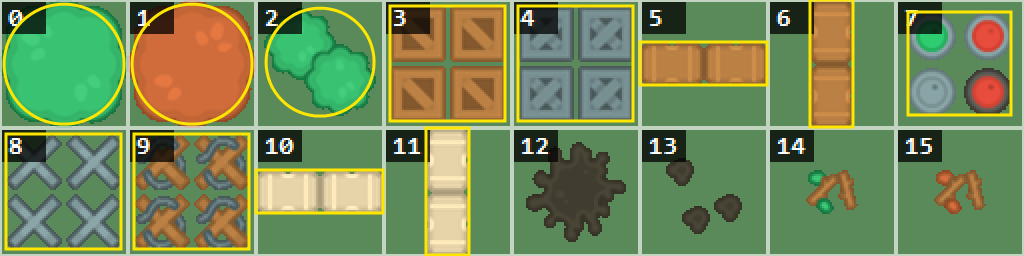
The colliders of the objects (shown twice as large). Most of them fit well, but look at tile 2: those are two small trees, and one circle around both also covers the empty corners. You will fix that in the assignment.
circlesandboxeswill hold the colliders of the objects in the map: at most one per tile.Initwill fill these in.
Add this to Init:
void Game::Init() { // a collider for every solid object in the map for (int y = 0; y < MapHeight; y++) for (int x = 0; x < MapWidth; x++) { if (objects[y][x] == -1) continue; const vec2 tile = { static_cast<float>(x * TileSize), static_cast<float>(y * TileSize) }; const Circle circle = objectCircles[objects[y][x]]; const Box box = objectBoxes[objects[y][x]]; if (circle.radius > 0) circles[circleCount++] = { tile + circle.center, circle.radius }; else if (box.max.x > box.min.x) boxes[boxCount++] = { tile + box.min, tile + box.max }; } }For every object in the map, Init takes its collider, moves it to the tile (by adding the position of the tile), and adds it to circles or boxes. circleCount++ uses the count as the index, and then adds 1 to it: the next collider goes into the next element.
Overlap Tests
Section titled “Overlap Tests”Now the interesting part: do two shapes overlap? There is a test for each pair of shapes. Add them below the colliders, one by one.
Circle - Circle
Section titled “Circle - Circle” bool Overlaps(const Circle& a, const Circle& b) { const float distance = (a.center - b.center).length(); return distance < a.radius + b.radius; }Two circles overlap when the distance between their centres is less than the sum of their radii:
where is the centre of a circle, and its radius. Think of it like this: two circles that just touch, have their centres exactly apart. Any closer, and they overlap.
length calculates , and a square root is a fairly slow calculation. But we don’t need the distance itself, only whether it is smaller than the sum of the radii. Both sides are positive numbers, so we can square them: means exactly the same as . And the squared length is just , without the square root. vec2 has sqrLength for that:
bool Overlaps(const Circle& a, const Circle& b){ const float sum = a.radius + b.radius; return (a.center - b.center).sqrLength() < sum * sum; // no square root}This version gives exactly the same answer. When a game tests thousands of pairs of circles every frame, it’s worth it. Our game only has a few dozen colliders, so in this part we keep the first version: it reads like the formula.
Drag the blue circle: it turns red when it overlaps the grey one. The dashed line is the distance between the centres. The yellow arrow is the minimum translation vector: how far the blue shape must move to stop overlapping. You will need it later, in Collision Response.
Box - Box
Section titled “Box - Box” bool Overlaps(const Box& a, const Box& b) { return a.min.x < b.max.x && b.min.x < a.max.x && a.min.y < b.max.y && b.min.y < a.max.y; }Two boxes overlap when they overlap on the x axis and on the y axis. On one axis, a box is just an interval: from min.x to max.x. Two intervals overlap when each one starts before the other one ends: a.min.x < b.max.x (a starts before b ends) and b.min.x < a.max.x (b starts before a ends). The same goes for the y axis.
Drag the blue box. Next to the axes, you see the intervals of both boxes: at the bottom on the x axis, and at the left on the y axis. An interval of the blue box turns red when it overlaps the grey one, and the boxes only overlap when both pairs do.
Circle - Box
Section titled “Circle - Box”This one needs a trick: first, find the point of the box that is closest to the centre of the circle. Add both functions:
// The point in the box that is closest to p (p itself, when it is inside the box). vec2 ClosestPoint(const Box& box, vec2 p) { return { std::clamp(p.x, box.min.x, box.max.x), std::clamp(p.y, box.min.y, box.max.y) }; }
bool Overlaps(const Circle& circle, const Box& box) { const float distance = (circle.center - ClosestPoint(box, circle.center)).length(); return distance < circle.radius; }std::clamp (from <algorithm>) keeps a value between a minimum and a maximum. Clamping the centre of the circle to the box, on both axes, gives the point of the box closest to it. Then the circle overlaps the box when that point is closer to the centre than the radius. And when the centre of the circle is inside the box, the closest point is the centre itself: the distance is 0, so the circle certainly overlaps.
Drag the blue circle. The white dot is the point of the box that is closest to the centre of the circle. Move the circle along a side of the box, and around a corner, to see how the closest point follows it.
The Tank as a Circle
Section titled “The Tank as a Circle”Our tank is a circle (with a radius of 20 pixels). Replace IsFree and TankFits by this version of TankFits, which tests the circle of the tank against every collider:
constexpr float TankRadius = 20; // the collider of a tank is a circle
// Can the tank stand here? Its circle must be inside the map, and it may not overlap any collider. bool TankFits(vec2 position) { const Circle tankCircle = { position, TankRadius }; if (position.x < TankRadius || position.y < TankRadius || position.x > MapWidth * TileSize - TankRadius || position.y > MapHeight * TileSize - TankRadius) return false; // (partly) outside the map for (int i = 0; i < circleCount; i++) if (Overlaps(tankCircle, circles[i])) return false; for (int i = 0; i < boxCount; i++) if (Overlaps(tankCircle, boxes[i])) return false; return true; }And change the two calls in Move: TankFits now takes a vec2:
if (TankFits({ position.x + step.x, position.y })) position.x += step.x; else velocity.x = 0; if (TankFits({ position.x, position.y + step.y })) position.y += step.y; else velocity.y = 0;To see the colliders, add a function that draws a circle (as 32 short lines; the template has no circle function) below the overlap tests:
// Draws the outline of a circle, as 32 short lines. void DrawCircle(Surface& target, const Circle& circle, Pixel color) { for (int i = 0; i < 32; i++) { const float a1 = i * 2 * PI / 32, a2 = (i + 1) * 2 * PI / 32; target.Line(circle.center.x + circle.radius * std::cos(a1), circle.center.y + circle.radius * std::sin(a1), circle.center.x + circle.radius * std::cos(a2), circle.center.y + circle.radius * std::sin(a2), color); } }And let Tab show them. Add a variable below the tanks:
bool showColliders = false; // Tab shows the collidersAnd draw the colliders at the end of Tick:
if (GetKeyPressed(SDL_SCANCODE_TAB)) showColliders = !showColliders; if (showColliders) { for (int i = 0; i < circleCount; i++) DrawCircle(screen, circles[i], 0xffffff); for (int i = 0; i < boxCount; i++) screen.Box(static_cast<int>(boxes[i].min.x), static_cast<int>(boxes[i].min.y), static_cast<int>(boxes[i].max.x) - 1, static_cast<int>(boxes[i].max.y) - 1, 0xffffff); DrawCircle(screen, { player.position, TankRadius }, 0xffff00); DrawCircle(screen, { enemy.position, TankRadius }, 0xffff00); } }screen.Box draws the outline from the first corner up to and including the second one. max is the edge just after the last pixel of a box (see the note in Box - Box), so the last pixel of the box is max - 1.
Press Tab to see the colliders. The tank now gets much closer to the trees. (Click the demo first, so that it gets the keys.)
The tank now stops at the shape of a tree instead of its tile. But it still stops: TankFits only lets the tank move along an axis that is completely free, so against a round tree, it jerks or gets stuck instead of sliding around it. Time to do it properly.
Collision Response
Section titled “Collision Response”Testing whether two shapes overlap is called collision detection. Doing something about it is called collision response. For a tank that drives into a wall, the most natural response is: move the tank out of the wall, the shortest way. Then, when you drive diagonally into a wall, the tank slides along it.
The Minimum Translation Vector
Section titled “The Minimum Translation Vector”For that, we need to know how far, and in which direction, the tank must move to stop overlapping: the shortest vector that moves it out. That vector is called the minimum translation vector, or MTV. It’s the yellow arrow in the demos above, and it starts at the centre of the blue shape. Like the overlap tests, there is a PushOut function for each pair of shapes, which calculates the MTV. The tank is a circle, so it needs two of these functions: one for a circle against a circle, and one for a circle against a box. The third one, box against box, completes the set (you will need it in the assignment). Add these functions below the overlap tests.
Circle - Circle
Section titled “Circle - Circle” // How far circle a must move to stop overlapping circle b: a vector that points away from b, as long as the // overlap. A zero vector when they don't overlap. vec2 PushOut(const Circle& a, const Circle& b) { const vec2 difference = a.center - b.center; const float distance = difference.length(); const float overlap = a.radius + b.radius - distance; if (overlap <= 0) return {}; if (distance == 0) return { overlap, 0 }; // exactly on top of each other: any direction will do return difference / distance * overlap; }The shortest way out of another circle is straight away from its centre: along the line through both centres. So the MTV has:
- a direction: from the centre of b to the centre of a, as a unit vector. That’s
difference / distance. - a length: the overlap. The circles touch when their centres are
a.radius + b.radiusapart, so they overlap by the sum of the radii minus the distance.
When the circles don’t overlap, the overlap is 0 or negative, and the function returns a zero vector: then the push doesn’t change anything. And when the centres are exactly on top of each other, there is no direction (and difference / distance would divide by zero), so we just pick one: to the right.
Box - Box
Section titled “Box - Box” // How far box a must move to stop overlapping box b: the shortest of the four ways out (left, right, up or down). // A zero vector when they don't overlap. vec2 PushOut(const Box& a, const Box& b) { if (!Overlaps(a, b)) return {}; const float left = b.min.x - a.max.x, right = b.max.x - a.min.x; // move a to the left (negative) or right const float up = b.min.y - a.max.y, down = b.max.y - a.min.y; // move a up (negative) or down const float x = -left < right ? left : right; // the shorter way out on the x axis const float y = -up < down ? up : down; // and on the y axis if (std::abs(x) < std::abs(y)) return { x, 0 }; return { 0, y }; }Two overlapping boxes can be separated in four ways: move box a to the left, to the right, up, or down, until it just touches box b. The MTV is the shortest of the four:
- To the left, a moves until its right side (
a.max.x) is at the left side of b (b.min.x): that’sb.min.x - a.max.x, a negative number. To the right, a moves until its left side is at the right side of b:b.max.x - a.min.x, a positive number.xis the shorter of the two (compared without the minus sign). - The same goes for up and down:
yis the shorter way out on the y axis. - Then the shorter of
xandywins (std::absgives the value without its sign), and the MTV moves the box along that axis only.
So an MTV between two boxes is always horizontal or vertical. Drag the blue box in the box - box demo above, and see the arrow switch between the axes. The tank doesn’t use this function (it’s a circle), but you will need it in the assignment.
Circle - Box
Section titled “Circle - Box” // How far the circle must move to stop overlapping the box (a zero vector when they don't overlap). vec2 PushOut(const Circle& circle, const Box& box) { const vec2 difference = circle.center - ClosestPoint(box, circle.center); const float distance = difference.length(); if (distance >= circle.radius) return {}; if (distance > 0) return difference / distance * (circle.radius - distance); // the middle of the circle is inside the box: push it out through the nearest side const float left = circle.center.x - box.min.x, right = box.max.x - circle.center.x; const float top = circle.center.y - box.min.y, bottom = box.max.y - circle.center.y; const float nearest = std::min({ left, right, top, bottom }); if (nearest == left) return { -(left + circle.radius), 0 }; if (nearest == right) return { right + circle.radius, 0 }; if (nearest == top) return { 0, -(top + circle.radius) }; return { 0, bottom + circle.radius }; }This one starts like the overlap test: with the closest point of the box. The shortest way out of the box is straight away from that point:
- the direction is from the closest point to the centre of the circle:
difference / distance. - the length is how far the circle reaches past that point: the radius minus the distance.
Again, the function returns a zero vector when there is no overlap. But there is a special case: when the centre of the circle is inside the box, the closest point is the centre itself. The distance is 0, and there is no direction. Then we look at the four sides of the box instead: left is the distance from the centre to the left side, right to the right side, and so on. The nearest side is the shortest way out: the circle moves out through that side, far enough that its centre passes the side (left), and then its radius too (circle.radius). In the circle - box demo above, drag the circle into the box, past its centre, and see how the arrow jumps from one side to another.
Sliding Along Obstacles
Section titled “Sliding Along Obstacles”Now the tank can use the MTV. Remove TankFits, and add a new method Push to the Tank class:
void Move(vec2 direction, float deltaTime); void Push(vec2 push); void Update(float deltaTime);Push moves the tank out of a collider. Add it below Move:
// Moves the tank out of a collider, and removes the part of its velocity that points into the collider. void Tank::Push(vec2 push) { const float length = push.length(); if (length == 0) return; // no overlap position += push; const vec2 normal = push / length; // the direction of the push, with length 1 const float inwards = velocity.dot(normal); // negative when the tank drives into the collider if (inwards < 0) velocity -= normal * inwards; }Push moves the tank, and it also changes the velocity. The normal is the direction of the push, as a unit vector: it points out of the collider. velocity.dot(normal) is the part of the velocity along the normal. When it’s negative, the tank drives into the collider, and that part is removed. What’s left of the velocity points along the collider, and that’s why the tank slides.
Drag the blue circle at the tip of the velocity: when the velocity points into the wall, velocity.dot(normal) is negative. The red part (along the normal) is removed, and the green part (along the wall) is what’s left: the new velocity. Drag the yellow circle on the wall to turn the wall, and reset to start over.
Then replace Move by this version:
// Drives the tank in a direction (a vector with length 1, or 0 to brake), and pushes it out of the colliders. void Tank::Move(vec2 direction, float deltaTime) { const vec2 acceleration = direction * Acceleration - velocity * Drag; velocity += acceleration * deltaTime; // first the velocity... position += velocity * deltaTime; // ...then the position, with the new velocity // the tank's circle at its new position (every push moves the tank, so it is made again for each collider) for (int i = 0; i < circleCount; i++) Push(PushOut(Circle{ position, TankRadius }, circles[i])); for (int i = 0; i < boxCount; i++) Push(PushOut(Circle{ position, TankRadius }, boxes[i])); // face the direction in which the tank drives: one of the 16 frames if (velocity.length() > 0.01f) { const float angle = std::atan2(velocity.x, -velocity.y); // 0 is up, PI / 2 is right frame = (static_cast<int>(std::round(angle / (2 * PI) * 16)) + 16) % 16; } }Move moves the tank first, without checking anything. Then it pushes the tank out of every collider that it overlaps. Every push moves the tank, so the circle of the tank is made again for each collider.
The tanks also shouldn’t leave the map. Instead of a special check, we put four boxes around it: walls, just outside the screen. First, make room for them in the arrays of colliders:
constexpr int MaxColliders = MapWidth * MapHeight + 4;Then add them to the end of Init:
// four walls around the map, so that the tanks stay on it constexpr float W = MapWidth * TileSize, H = MapHeight * TileSize; boxes[boxCount++] = { { -100, -100 }, { W + 100, 0 } }; // above the map boxes[boxCount++] = { { -100, H }, { W + 100, H + 100 } }; // below boxes[boxCount++] = { { -100, 0 }, { 0, H } }; // to the left boxes[boxCount++] = { { W, 0 }, { W + 100, H } }; // to the rightW and H are the width and the height of the map in pixels: 768 and 512. Each wall is a box, described by its top-left and its bottom-right corner, like the colliders of the objects:
- The wall above the map goes from y = -100 to 0: it ends exactly where the map starts. The wall below it starts exactly where the map ends, at y =
H, and goes 100 pixels further. - The walls to the left and to the right do the same on the x axis, and they are exactly as high as the map (from 0 to
H). - The walls above and below the map stick out 100 pixels on both sides (from x = -100 to
W + 100), so that they also cover the corners: together, the four walls leave no gap anywhere around the map.
The tank needs no special code for the walls: they are boxes like any other collider, so Move pushes the tank out of them, and it slides along them.
The four walls around the map, each with its own outline. Each wall is a box of 100 pixels thick, just outside the screen: only the part near the map is shown here. The boxes above and below the map are wider than the map, so that they also cover the corners; the boxes to the left and to the right are exactly as high as the map.
The Enemy
Section titled “The Enemy”So far, the enemy drives to the right, and when it leaves the map, it comes back on the left. Its Update changes its position directly, so it ignores the colliders: it drives right through the walls. Let’s make it drive with Move, like the player, so that it bumps into things too. Then it can’t leave the map anymore, so it will drive back and forth instead, and turn around when it can’t go further. For that, it needs to remember which way it’s going: add a variable patrol to the Tank class (the player’s tank doesn’t use it):
int color; // the row in tank.png: 0 is green, 1 is red float patrol = 1; // for the enemy: 1 drives to the right, -1 to the leftThen replace its Update:
// The enemy drives to the right and back; it turns around when it is blocked. void Tank::Update(float deltaTime) { Move({ patrol, 0 }, deltaTime); if (velocity.x * patrol <= 0) patrol = -patrol; }And give the enemy a new starting point: on the map, instead of just outside it:
Tank player({ 3 * TileSize + 32, 2 * TileSize + 32 }, 0, 0); Tank enemy({ 32, 4 * TileSize + 32 }, 4, 1);Finally, the tanks push each other. Both move half of the overlap, in opposite directions:
player.Move(direction, deltaTime); enemy.Update(deltaTime); // the tanks push each other apart: both move half of the overlap const vec2 push = PushOut(Circle{ player.position, TankRadius }, Circle{ enemy.position, TankRadius }); player.Push(push * 0.5f); enemy.Push(-push * 0.5f);The tank slides along obstacles, and the tanks push each other. Drive diagonally into a tree or the sandbags, and try to block the red tank. (Click the demo first, so that it gets the keys.)
Bodies
Section titled “Bodies”In the last section, the push changed two things: the position, and the velocity. For a tank against a wall, that was simple enough. But when the tank pushes a drum, which pushes another drum into a wall, it gets complicated: which velocity changes, and by how much?
There is a neat way around that. Remember the position from the previous step. After all the pushing, the velocity is simply how far the object really moved, divided by the time:
Now a push only has to move positions. The velocity follows automatically: a tank that is pushed back by a wall, didn’t move (much), so it has no velocity (in that direction). This idea is called Verlet integration, after the physicist Loup Verlet, who used it in the 1960s to simulate molecules [1]. In its classic form, it doesn’t store a velocity at all:
The distance of the last step, , is the velocity (times ). We will keep a velocity variable, because the engine and the drag need it, but it’s the same thing: when the velocity is calculated from the positions after every step, the result is exactly the formula above.
Moving objects by moving their positions, and calculating the velocity afterwards, is called position-based dynamics (PBD) [2]. Let’s apply it to everything that moves: the tanks, and some drums for them to push around.
A body is a circle that moves. Add this struct below the overlap tests:
// A body: a circle that moves, and bumps into colliders and other bodies. struct Body { vec2 position, velocity; // in pixels, and pixels per millisecond vec2 previous; // the position before the last step vec2 drive; // the acceleration that the body gives itself (the engine of a tank) float drag = 0; // the part of its velocity that the body loses every millisecond float radius = 0; float inverseMass = 0; // 1 / mass: a heavy body has a small inverse mass };positionandvelocityare what the tank had before.previousis new: the position before the last step, so that we can calculate the velocity from how far the body moved.driveanddragturn the acceleration of the tank into something every body can have: an engine (drive) and friction (drag). The drums have no engine, and a smaller drag than the tanks: they slide further.radiusmakes the body a circle, for the collisions.inverseMassis 1 divided by the mass: . A heavy body has a small inverse mass, and a light body a large one.
- Every member gets a starting value (
= 0, andvec2starts at 0 by itself), like the queue of part 13: a new body is at rest, at the origin.
Collide
Section titled “Collide”A body bumps into the colliders of the map, just like the tank did. Add this function below Body:
// Moves a body out of all colliders: the colliders don't move. void Collide(Body& body) { for (int i = 0; i < circleCount; i++) body.position += PushOut(Circle{ body.position, body.radius }, circles[i]); for (int i = 0; i < boxCount; i++) body.position += PushOut(Circle{ body.position, body.radius }, boxes[i]); }Collide pushes the body out of every collider that it overlaps, with the same PushOut functions as before. The colliders don’t move, so the body moves the whole way out. Compare it with the Push method of the last section: the velocity isn’t changed here. That’s the point of position-based dynamics: the velocity will be calculated from the positions afterwards.
Separate
Section titled “Separate”When two bodies overlap, both should move. Add this function below Collide:
// Moves two overlapping bodies apart. The lighter body moves the most: each moves a part of the overlap that // matches its inverse mass. void Separate(Body& a, Body& b) { const vec2 push = PushOut(Circle{ a.position, a.radius }, Circle{ b.position, b.radius }); const float total = a.inverseMass + b.inverseMass; if (total == 0) return; // two bodies that can't move a.position += push * (a.inverseMass / total); b.position -= push * (b.inverseMass / total); }How far each body moves depends on its mass. When a tank (10 times as heavy) bumps into a drum, the drum should move 10 times as far as the tank. With inverse masses and , and the MTV push (which moves a out of b), body a moves a part of the push, and body b the rest, in the other direction:
The tank () moves of the overlap, and the drum () the other . Two equally heavy bodies each move half, like the two tanks did in the last section. And a body with an inverse mass of 0 doesn’t move at all: the other body moves the whole way, as if it hit a wall. Only when both inverse masses are 0, there is nothing to divide by: then neither body can move, and Separate returns right away.
Tanks and Drums
Section titled “Tanks and Drums”The tank now gets a Body, instead of its own position and velocity. Start with the constants: Drag becomes TankDrag (the drums get a drag of their own), and a tank gets a mass:
constexpr float Acceleration = 0.003f; // how fast a tank speeds up, in pixels per millisecond per millisecond constexpr float TankDrag = 0.02f; // how fast a tank slows down: this part of its speed is lost every millisecond constexpr float TankMass = 10; // a tank is ten times as heavy as a drumThe drums will have a mass of 1, so a tank is 10 times as heavy as a drum. Then the class:
class Tank { public: Tank(vec2 startPosition, int startFrame, int startColor) { body.position = startPosition; body.drag = TankDrag; body.radius = 20; body.inverseMass = 1 / TankMass; frame = startFrame; color = startColor; } void Drive(vec2 direction); void Update(); void Draw(Surface& target) const; Body body; int frame; // the direction: 0 is up, 4 is right, 8 is down, 12 is left int color; // the row in tank.png: 0 is green, 1 is red float patrol = 1; // for the enemy: 1 drives to the right, -1 to the left };bodyreplacespositionandvelocity. The constructor sets up the body: its position, its drag, its radius (20 pixels, like before) and its inverse mass.MovebecomesDrive: the tank no longer moves itself. AndPushis gone (remove its definition too): the physics will move the tank, and the velocity takes care of itself.Updateno longer needsdeltaTime: the enemy only decides which way to drive.
Drive only sets the drive of the body: the direction times Acceleration (the tank’s acceleration). Replace the Move method by Drive:
// Drives the tank in a direction (a vector with length 1, or 0 to brake). void Tank::Drive(vec2 direction) { body.drive = direction * Acceleration; // face the direction in which the tank drives: one of the 16 frames if (body.velocity.length() > 0.01f) { const float angle = std::atan2(body.velocity.x, -body.velocity.y); // 0 is up, PI / 2 is right frame = (static_cast<int>(std::round(angle / (2 * PI) * 16)) + 16) % 16; } }The frame of the tank still follows the velocity, but now it’s the velocity of the body.
The enemy uses Drive too. Change the Drive method to this:
// The enemy drives to the right and back; it turns around when it is blocked. void Tank::Update() { if (body.velocity.x * patrol < 0.001f) patrol = -patrol; // (almost) not moving in the patrol direction Drive({ patrol, 0 }); }The check comes before Drive now: body.velocity is the velocity that the physics calculated in the last frame, after all collisions. When the enemy (almost) didn’t move in its patrol direction, it was blocked, and it turns around.
And Draw uses the position of the body:
void Tank::Draw(Surface& target) const { tank.SetFrame(frame, color); barrel.SetFrame(frame, color); tank.Draw(target, static_cast<int>(body.position.x) - 32, static_cast<int>(body.position.y) - 32); barrel.Draw(target, static_cast<int>(body.position.x) - 32, static_cast<int>(body.position.y) - 32); }Then the drums. Each tile of barrels in the map (tile 7) will become 4 loose drums; Init will make them (see Putting It Together):
// The drums: the barrels of objects.png (tile 7) as loose bodies. Each tile of barrels becomes 4 drums. constexpr int MaxDrums = 16; Body drums[MaxDrums]; int drumColors[MaxDrums]; // the frame in drums.png: green, red, rust or black int drumCount = 0;drumColors remembers which of the 4 frames of drums.png each drum shows:
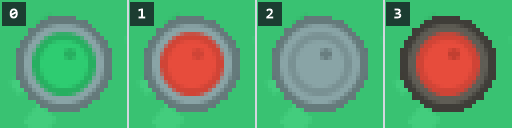
drums.png (shown 4 times as large, on grass): 4 frames of 24 × 24 pixels. These are the same 4 barrels as tile 7 of objects.png, in the same order: frame 0 is the top-left barrel of the tile, 1 the top-right one, 2 the bottom-left one, and 3 the bottom-right one.
Finally, an array of pointers to all bodies (see part 8): the tanks, and the drums. With that, one loop can handle the tanks and the drums alike:
// All bodies that bump into each other: the tanks and the drums (filled in by Init). Body* bodies[2 + MaxDrums]; int bodyCount = 0;Simulate
Section titled “Simulate”And now the physics itself. Add the Simulate function below the bodies:
// One step of the physics: every body moves, the overlaps are solved by moving the bodies, and then the // velocity of each body follows from how far it really moved. void Simulate(float deltaTime) { for (int i = 0; i < bodyCount; i++) { Body& body = *bodies[i]; body.previous = body.position; body.velocity += (body.drive - body.velocity * body.drag) * deltaTime; body.position += body.velocity * deltaTime; } for (int iteration = 0; iteration < 4; iteration++) // solving one overlap can cause another: repeat { for (int i = 0; i < bodyCount; i++) for (int j = i + 1; j < bodyCount; j++) Separate(*bodies[i], *bodies[j]); for (int i = 0; i < bodyCount; i++) Collide(*bodies[i]); } for (int i = 0; i < bodyCount; i++) bodies[i]->velocity = (bodies[i]->position - bodies[i]->previous) / deltaTime; }- First, every body remembers where it is (the
previousposition): we’ll need that at the end, to calculate thevelocity. - Then it moves: its drive and drag change its velocity, and the velocity moves it (semi-implicit Euler again).
- Then the overlaps are resolved between all pairs of bodies (
jstarts ati + 1, so every pair is handled once, and a body is never compared with itself), and between every body and the colliders.
- Finally, each velocity is calculated from how far the body actually moved.
Putting It Together
Section titled “Putting It Together”First, add the sprite of the drums at the top of game.cpp, below the other sprites:
Sprite drumSprite("assets/drums.png", 4);Then Init turns the barrels of the map (tile 7) into drums, and fills the array of bodies:
void Game::Init() { // a collider for every solid object in the map; the barrels become drums for (int y = 0; y < MapHeight; y++) for (int x = 0; x < MapWidth; x++) { if (objects[y][x] == 7) { const vec2 offsets[4] = { { 18, 18 }, { 46, 18 }, { 18, 46 }, { 46, 46 } }; for (int i = 0; i < 4; i++) { Body& drum = drums[drumCount]; drum.position = vec2(static_cast<float>(x * TileSize), static_cast<float>(y * TileSize)) + offsets[i]; drum.drag = 0.004f; // drums slide further than tanks drum.radius = 12; drum.inverseMass = 1; drumColors[drumCount++] = i; } objects[y][x] = -1; // the tile itself is empty now } if (objects[y][x] == -1) continue; const vec2 tile = { static_cast<float>(x * TileSize), static_cast<float>(y * TileSize) }; const Circle circle = objectCircles[objects[y][x]]; const Box box = objectBoxes[objects[y][x]]; if (circle.radius > 0) circles[circleCount++] = { tile + circle.center, circle.radius }; else if (box.max.x > box.min.x) boxes[boxCount++] = { tile + box.min, tile + box.max }; } // four walls around the map, so that the tanks stay on it constexpr float W = MapWidth * TileSize, H = MapHeight * TileSize; boxes[boxCount++] = { { -100, -100 }, { W + 100, 0 } }; // above the map boxes[boxCount++] = { { -100, H }, { W + 100, H + 100 } }; // below boxes[boxCount++] = { { -100, 0 }, { 0, H } }; // to the left boxes[boxCount++] = { { W, 0 }, { W + 100, H } }; // to the right
bodies[bodyCount++] = &player.body; bodies[bodyCount++] = &enemy.body; for (int i = 0; i < drumCount; i++) bodies[bodyCount++] = &drums[i]; }- When
Initfinds a tile of barrels (tile 7), it makes 4 drums: one for each barrel in the picture. offsetsholds the middle of each barrel within its tile, in the same order as the frames ofdrums.png, so drumigets framei.- Each drum gets a smaller drag than a tank (so it slides further), a radius of 12 pixels (half of the 24 pixels of its frame), and an inverse mass of 1.
drums[drumCount]is the next free drum, anddrumColors[drumCount++]stores its frame and then moves on to the next one.- Then the tile is made empty (-1): the barrels are drums now, so the tile shouldn’t be drawn anymore, and it shouldn’t get a collider either. That’s why this happens before the
if (objects[y][x] == -1) continue;. - At the end, the array
bodiesgets the addresses of the two tanks and all drums. From now on, the physics only works with these pointers.
And in Tick, the tanks drive, the physics moves everything, and the drums are drawn:
player.Drive(direction); enemy.Update(); Simulate(deltaTime);
for (int i = 0; i < drumCount; i++) { drumSprite.SetFrame(drumColors[i]); drumSprite.Draw(screen, static_cast<int>(drums[i].position.x) - 12, static_cast<int>(drums[i].position.y) - 12); } player.Draw(screen);Show the bodies with the colliders too:
for (int i = 0; i < bodyCount; i++) DrawCircle(screen, { bodies[i]->position, bodies[i]->radius }, 0xffff00);Push the drums around: they are light, so the tank barely notices them, but the red tank (just as heavy as yours) is hard to push. (Click the demo first, so that it gets the keys.)
Constraints and XPBD
Section titled “Constraints and XPBD”In the last section, we moved bodies to solve overlaps. That’s a constraint: a rule that the positions must follow. “These two circles may not overlap” is a constraint, and so is “this body stays out of that box”. PBD can handle any constraint that you can write as a rule about positions. For example: “these two bodies stay exactly 10 pixels apart”. Chain a number of bodies together with that constraint, and you have a rope.
That’s what we will build in this section: a tow cable for the player’s tank. One end of the cable is attached to the tank, and the other end to a drum, so that the tank can drag the drum around the map. In between, the cable is a chain of small, light bodies (the links), and each link stays at a fixed distance from its neighbours. But first, we need a better way to solve constraints like that.
Plain PBD has a problem though: how stiff a constraint feels depends on the time step and the number of iterations. Do more iterations, and the rope gets stiffer. In 2016, Miles Macklin, Matthias Müller and Nuttapong Chentanez fixed that with XPBD (extended position-based dynamics) [3]. XPBD adds one number to every constraint: its compliance , the opposite of stiffness. With a compliance of 0, the constraint is solved completely, like before. With a larger compliance, it is solved only partly, so the bodies can get a bit further apart than the rule says: the constraint stretches, like a spring. And it behaves the same, whatever the time step.
For a distance constraint between two bodies and , with rest length , the error is how far the distance is off:
XPBD moves both bodies along the line between them, by:
where is the unit vector from to , the inverse masses, and the time step. With , the two bodies together move exactly far enough to make zero: afterwards, their distance is exactly . How that movement is shared between them depends on their masses, just like in Separate: body moves the part of the error, and body the rest. So the lighter body moves the most, and a body with an inverse mass of 0 doesn’t move at all. The term makes the correction smaller: the bodies don’t move all the way back to a distance of , so a cable can stretch a little when you pull it, like a spring. The larger the compliance, the more it stretches. (The full XPBD method keeps a running total of the corrections over the iterations, called . With the next trick, we don’t need it.)
That trick is substepping: instead of one step with 4 iterations, the physics does 8 small steps, with one iteration each. In 2019, Miles Macklin, Matthias Müller and their colleagues showed that many small steps are much more accurate than many iterations, for the same amount of work [4]. The time step of one substep is the time of the frame, divided by the number of substeps. In the code, it’s called h (as in that paper): h = deltaTime / Substeps. That’s the of the formula above.
First the tow cable mentioned at the start of this section. It’s a chain of 16 links: light bodies, each held at linkLength from its neighbours by a distance constraint: the first one from the player’s tank, and the last one from a drum. Add these variables below bodies and bodyCount:
// The tow cable: a chain of light bodies (the links) between the player's tank and a drum (set up by Init). constexpr int CableLinks = 16; Body cable[CableLinks]; Body* cableStart; // the bodies at the ends of the cable Body* cableEnd; float linkLength; // the distance between two neighbours in the chain float compliance = 0; // how much the cable stretches: 0 is a steel cableThen two new functions, which the new version of Simulate (at the end of this section) will use: KeepDistance and Integrate. Let’s start with KeepDistance, the function that solves a distance constraint: it moves two bodies, so that the rule “stay restLength apart” holds (or holds better, when the compliance isn’t 0):
// An XPBD distance constraint: moves a and b so that their distance gets closer to restLength. With a compliance // of 0, it gets restLength exactly; a larger compliance makes the constraint softer, like a spring. void KeepDistance(Body& a, Body& b, float restLength, float compliance, float h) { const vec2 difference = b.position - a.position; const float distance = difference.length(); const float total = a.inverseMass + b.inverseMass; if (distance == 0 || total == 0) return; const float error = distance - restLength; // C: positive when the distance is too large const float correction = error / (total + compliance / (h * h)); // how far to move, per unit of inverse mass const vec2 direction = difference / distance; // from a to b, with length 1 a.position += direction * (correction * a.inverseMass); b.position -= direction * (correction * b.inverseMass); }KeepDistance is the formula shown above, in code:
differenceis the vector fromatob, anddistanceits length.directionis the same vector with length 1: that’s .erroris : how much too long (positive) or too short (negative) the distance is.correctionis the fraction of the formula, without the inverse mass: the error, divided by the sum of the inverse masses plus . Here,his .- Each body then moves along
direction, by the correction times its own inverse mass:atowardsbwhen the distance is too long, andbtowardsa. - When the two bodies are at the same spot, there is no direction (and
difference / distancewould divide by zero); and when both inverse masses are 0, neither body can move. In both cases, the function does nothing.
Next, a function that moves one body during a substep:
// Moves a body during a (sub)step: it remembers where it was, its drive and drag change its velocity, and its // velocity changes its position. void Integrate(Body& body, float h) { body.previous = body.position; body.velocity += (body.drive - body.velocity * body.drag) * h; body.position += body.velocity * h; }Integrate is the first loop of the old Simulate, for a single body: it remembers where the body is, and then moves it, with a time step of h instead of deltaTime. Because it’s a function now, the same code moves the tanks, the drums, and the links of the cable.
And finally, Simulate itself, with the number of substeps:
constexpr int Substeps = 8;
// The physics of one frame, in a number of small steps. In each step, every body moves; the overlaps and the // cable are solved by moving the bodies; and then the velocity of each body follows from how far it really moved. void Simulate(float deltaTime) { const float h = deltaTime / Substeps; for (int step = 0; step < Substeps; step++) { for (int i = 0; i < bodyCount; i++) Integrate(*bodies[i], h); for (int i = 0; i < CableLinks; i++) Integrate(cable[i], h);
for (int i = 0; i < bodyCount; i++) for (int j = i + 1; j < bodyCount; j++) Separate(*bodies[i], *bodies[j]); KeepDistance(*cableStart, cable[0], linkLength, compliance, h); for (int i = 0; i + 1 < CableLinks; i++) KeepDistance(cable[i], cable[i + 1], linkLength, compliance, h); KeepDistance(cable[CableLinks - 1], *cableEnd, linkLength, compliance, h); for (int i = 0; i < bodyCount; i++) Collide(*bodies[i]); for (int i = 0; i < CableLinks; i++) Collide(cable[i]);
for (int i = 0; i < bodyCount; i++) bodies[i]->velocity = (bodies[i]->position - bodies[i]->previous) / h; for (int i = 0; i < CableLinks; i++) cable[i].velocity = (cable[i].position - cable[i].previous) / h; } }his the time of one substep: the frame divided intoSubsteps(8) equal parts.- Each substep does the same as the old
Simulatedid for a whole frame: everything moves (Integrate), then the constraints are solved once (the overlaps between the bodies, the links of the cable, and the colliders), and then the velocities follow from the positions. - The cable is solved link by link: the player’s tank with the first link, every link with the next one, and the last link with the drum.
- There are no iterations anymore: the substeps take their place.
Add a function to draw the cable (3 pixels wide, by drawing each line a few times, shifted by a pixel):
// Draws the cable: a line of 3 pixels wide through its links. Its colour shows the type of cable. void DrawCable(Surface& target) { Pixel color = 0x8c939c; // grey: a steel cable if (compliance > 0) color = 0x9c6b30; // brown: a rope if (compliance > 1000) color = 0xd8402f; // red: a bungee cord vec2 from = cableStart->position; for (int i = 0; i <= CableLinks; i++) { const vec2 to = i < CableLinks ? cable[i].position : cableEnd->position; for (int offset = -1; offset <= 1; offset++) { target.Line(from.x + offset, from.y, to.x + offset, to.y, color); target.Line(from.x, from.y + offset, to.x, to.y + offset, color); } from = to; } }The colour of the cable shows its type, so that you can see which one you picked: grey for a steel cable (a compliance of 0), brown for a rope, and red for a bungee cord (a compliance above 1000). The cable is a 3-pixel-wide line through the links: each piece is drawn 3 times next to each other, shifted by one pixel horizontally, and 3 times shifted vertically.
Set up the cable at the end of Init: the links start on a straight line between the tank and the drum, and linkLength makes the cable exactly long enough:
// the tow cable, from the player's tank to the first drum: straight, and not stretched cableStart = &player.body; cableEnd = &drums[0]; linkLength = (cableEnd->position - cableStart->position).length() / (CableLinks + 1); for (int i = 0; i < CableLinks; i++) { const float t = (i + 1) / static_cast<float>(CableLinks + 1); cable[i].position = cableStart->position + (cableEnd->position - cableStart->position) * t; cable[i].drag = 0.01f; cable[i].radius = 3; cable[i].inverseMass = 10; // a link weighs a tenth of a drum }And in Tick, the keys 1, 2 and 3 set the compliance, and the cable is drawn before the drums and the tanks:
player.Drive(direction); enemy.Update(); if (GetKeyPressed(SDL_SCANCODE_1)) compliance = 0; // a steel cable if (GetKeyPressed(SDL_SCANCODE_2)) compliance = 1000; // a rope if (GetKeyPressed(SDL_SCANCODE_3)) compliance = 5000; // a bungee cord Simulate(deltaTime);
DrawCable(screen);At the end of Tick, the links are shown with the colliders, and a line at the top of the screen tells you which keys to use (add #include <format> at the top for std::format):
for (int i = 0; i < CableLinks; i++) DrawCircle(screen, { cable[i].position, cable[i].radius }, 0xffff00); } screen.Bar(0, 0, ScreenWidth - 1, 15, 0x202020); screen.Print(std::format("CABLE: 1 STEEL 2 ROPE 3 BUNGEE (COMPLIANCE {}) TAB: COLLIDERS", compliance), 4, 5, 0xffffff);The tow cable. Drive away from the drum, and it follows. Press 3 for a bungee cord: the cable stretches, and the drum catches up with a swing. Press 1 for a steel cable again. Drive around a tree: the cable wraps around it. (Click the demo first, so that it gets the keys.)
The cable links are bodies too, so they bump into the trees and boxes (Collide): that’s why the cable wraps around obstacles. And notice how little code the cable needed: one function for the constraint, and a loop. That’s the strength of position-based dynamics: everything is a constraint on positions, and the velocities follow. Cloth is a grid of these distance constraints, and a ragdoll is a few bodies with distance constraints for the bones.
The compliance values (0, 1000 and 5000) have no special meaning. Time is measured in milliseconds, and the masses are numbers we chose ourselves: a drum has a mass of 1, a tank 10, and a link of the cable only 0.1. The links are that light on purpose: a heavy cable would hold the tank back, while a light one is still strong enough to pull the drum along. With made-up masses like these, the compliance has no unit that you could look up, so we simply tried values until the difference was easy to see. While the tank pulls the drum away, the rope stretches about 13%, and the bungee cord about 50%. (Even the steel cable stretches a little, about 1%: with one iteration per substep, the constraints are never solved exactly.) Tweaking values like this to get the desired result is very common in game physics.
Assignment
Section titled “Assignment”- Hook the cable to the enemy tank instead of a drum: a tug of war! Then give the enemy a stronger engine, so that it wins.
- Make oil (tile 12) slippery: a tank on oil has hardly any drag, and its tracks have little grip, so its engine is weak there too.
- Give the two small trees of tile 2 each their own circle, so that the tank can drive into the empty corners of the tile.
If you completed the basic assignment, the solution should look like this:
The result: a tug of war with the enemy, slippery oil, and a circle for each small tree (press Tab). (Click the demo first, so that it gets the keys.)
Intermediate
Section titled “Intermediate”- Fire shells with Space: a shell is a small, fast body that flies in the direction that the tank faces, knocks drums away, and disappears after a second.
- Press C to unhook the cable: the cable stays on the tank, and its loose end drags behind it. Press C again to hook the loose end to the drum that is nearest to the tank (when it is close enough: within the length of the cable).
- The cable goes right through the tanks and the drums: the links only bump into the static colliders of the map. Make the links bump into the dynamic bodies too, so that the cable wraps around the red tank and the other drums.
If you completed the intermediate assignment, the solution should look like this:
The result: shells, a cable that you can hook to another drum, and a cable that wraps around the red tank and the drums (press Tab to see the links). (Click the demo first, so that it gets the keys.)
-
Make the crates movable: each tile of crates (3 and 4) becomes one heavy box that slides, but doesn’t rotate. Use the
PushOutfor two boxes for a crate against the boxes of the map and against other crates, and write a version ofSeparatefor a body and a crate, by their inverse masses. -
Put a chain fence across the sandy road: two posts that never move, with a chain of links between them. A tank can push the fence aside, but the fence springs back.
- In the intermediate assignment, hooking a drum close to the tank makes the drum fly away. Find out why, and fix it: after hooking, the cable should hang slack, and only start pulling the drum when it is straight.
If you completed the hard assignment, the solution should look like this:
The result: heavy crates that slide, a chain fence across the road, and a cable that hooks a drum without making it fly (C to unhook and hook). (Click the demo first, so that it gets the keys.)
Once you have completed these, you may continue with the next part.
References
Section titled “References”[1] L. Verlet, ‘Computer “Experiments” on Classical Fluids. I. Thermodynamical Properties of Lennard-Jones Molecules’, Physical Review, vol. 159, no. 1, p. 98, 1967. doi:10.1103/PhysRev.159.98 ↩︎
[2] M. Müller, B. Heidelberger, M. Hennix and J. Ratcliff, ‘Position Based Dynamics’, in Virtual Reality Interactions and Physical Simulations (VRIPhys), 2006. PDF ↩︎
[3] M. Macklin, M. Müller and N. Chentanez, ‘XPBD: Position-Based Simulation of Compliant Constrained Dynamics’, in Motion in Games (MIG), 2016. PDF ↩︎ a b
[4] M. Macklin, K. Storey, M. Lu, P. Terdiman, N. Chentanez, S. Jeschke and M. Müller, ‘Small Steps in Physics Simulation’, in Symposium on Computer Animation (SCA), 2019. PDF ↩︎ a b
Comments